Posted on

The Guide to Choosing the Right Laptop Power Adapter

The Guide to Choosing the Right Laptop Power Adapter

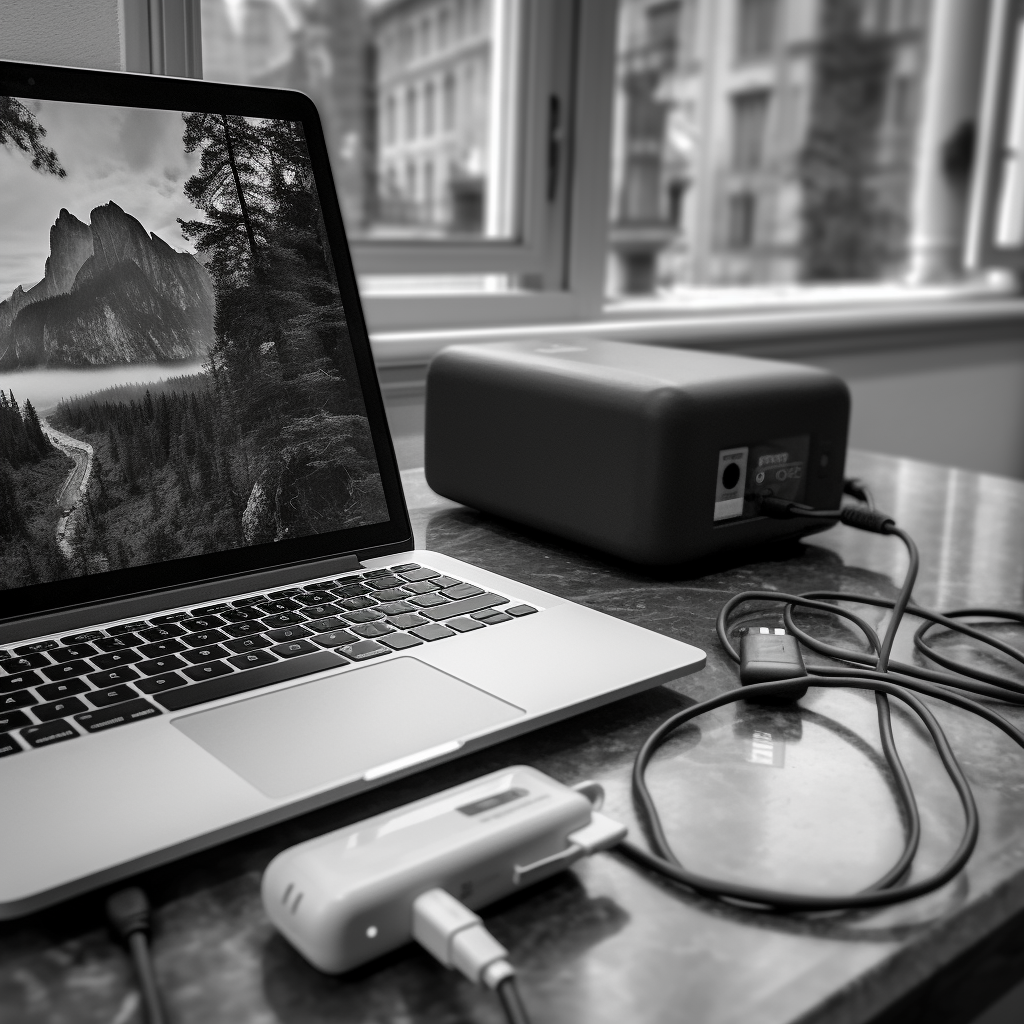
In an increasingly digital world, laptops are more than just a convenience – they’re a necessity. Whether we’re sending a critical business proposal, finishing a term paper, or simply catching up on our favorite shows, laptops are an integral part of our daily routine. However, these portable powerhouses rely on something many of us tend to overlook: the power adapter.

A power adapter might not be the most glamorous part of your laptop, but it plays a critical role in your device’s performance and longevity. Choosing the right power adapter can mean the difference between a smoothly running laptop and one plagued by battery issues or, even worse, hardware damage.

This comprehensive guide will shine a light on the crucial topic of laptop power adapters. From understanding their basic function and identifying their key features to discerning the importance of choosing the right one and learning how to do so, we’ve got you covered. In addition, you’ll find handy tips for buying power adapters and troubleshooting common problems, as well as answers to frequently asked questions.

Stay plugged into this guide to ensure your laptop’s power needs are always efficiently and safely met. Now, let’s charge into the fascinating world of laptop power adapters.

Understanding Laptop Power Adapters

*Laptop power adapters are more than just wires and plugs. They’re complex pieces of technology that have the vital role of providing your laptop with the power it needs. In this chapter, we will break down their function, discuss the common types, and identify key features.

2.1 Basic Function

Power adapters serve two main functions: converting the AC power from your wall outlet into the DC power your laptop uses, and providing the correct amount of this power to your laptop.

Table 1: AC/DC Power Conversion in Adapters

AC Power (from outlet)Power AdapterDC Power (to laptop)
High voltage, alternating currentConverts AC to DC, Adjusts voltage and currentLow voltage, direct current suitable for the laptop

2.2 Common Types

The two most common types of laptop power adapters are the ‘standard’ or ‘fixed’ power adapter, and the ‘universal’ or ‘adjustable’ power adapter.

Table 2: Types of Power Adapters

Standard Power AdapterUniversal Power Adapter
Comes with the laptop, Fixed power output, Specific connector typeBought separately, Adjustable power output, Various connector types included

2.3 Identifying Features

The voltage, current, and power of an adapter are usually marked on it. The voltage should match your laptop’s requirement exactly. Current output can be higher than the laptop’s rating, but never lower. Power (in Watts) is a function of the voltage and current (W=V*A) and should generally match your laptop’s needs. Lastly, the connector type must fit your laptop’s power input correctly.

Table 3: Identifying Adapter Features

FeatureUnitDescription
VoltageVolts (V)Should match laptop’s requirement
CurrentAmps (A)Can be higher, but not lower than laptop’s requirement
PowerWatts (W)Generally should match laptop’s needs (W=V*A)
Connector TypeN/AMust fit your laptop’s power input
The Guide to Choosing the Right Laptop Power Adapter

Why the Right Power Adapter Matters

Laptop power adapters may not be the most exciting topic, but they are critical for the following reasons: performance and battery life, safety considerations, and laptop durability.

3.1 Performance and Battery Life

The right power adapter ensures optimal performance and extends the battery life of your laptop. Using an adapter with incorrect specifications can cause poor performance and drastically reduce the life of your laptop’s battery.

3.2 Safety Considerations

Using an incorrect power adapter can create safety hazards. An adapter with too high voltage can cause overheating and potential fire risks, while an adapter with too low voltage may not provide enough power, causing the laptop to draw more current and overheat.

3.3 Durability of Your Laptop

Consistently using the wrong power adapter can damage the internal components of your laptop, affecting its longevity. Ensuring the use of the correct power adapter can prevent these issues and help your laptop last longer.

The Guide to Choosing the Right Laptop Power Adapter

Table 4: Importance of the Right Adapter

FactorDescription
Performance & Battery LifeEnsures optimal performance and battery longevity
SafetyPrevents overheating and potential fire hazards
DurabilityProlongs laptop’s lifespan by preventing internal damage

How to Find the Right Power Adapter for Your Laptop

Finding the right power adapter for your laptop may seem like a daunting task, but it becomes much simpler when you know what to look for. This chapter will guide you through the process, from checking your laptop’s manual to understanding the meaning of adapter specifications.

4.1 Checking Your Laptop’s Manual

Your laptop’s user manual is the first place to look when trying to find the correct power adapter. It will usually list the specifications for the required power adapter, including voltage, current, power, and connector type.

4.2 Looking at Your Current Adapter’s Specifications

If you can’t find your laptop’s manual or it doesn’t have the necessary information, check the specifications listed on your current adapter. Manufacturers typically print this information on a label on the adapter itself.

4.3 Understanding the Meaning of Adapter Specifications

Understanding adapter specifications is critical to choosing the right one.

Table 5: Understanding Adapter Specifications

SpecificationDescription
Voltage (V)The amount of potential energy, must match the laptop’s requirement exactly
Current (A)The flow rate of electricity, the adapter’s rating can be higher, but never lower than the laptop’s
Power (W)The overall capacity of the adapter (W=V*A), generally should match the laptop’s requirement
Connector TypeThe shape and size of the plug, must fit the laptop’s power input

Buying Tips for Laptop Power Adapters

Now that you know how to identify the right adapter, let’s discuss some tips for buying one.

5.1 Brand vs. Universal Adapters

While branded adapters from your laptop’s manufacturer ensure compatibility and quality, universal adapters offer flexibility and come with multiple tips for different laptops.

5.2 Where to Buy: Physical Store vs. Online

Buying from a physical store allows you to check the adapter personally, but online stores typically have a wider range of options and might offer better prices.

5.3 Price Considerations

While it might be tempting to go for the cheapest option, remember that an unreliable adapter can damage your laptop in the long run. Balance cost considerations with quality and reliability.

Table 6: Buying Tips for Power Adapters

TipDescription
Brand vs. UniversalBalance between guaranteed compatibility and flexibility
Buying LocationPhysical stores for personal inspection, online for more options and potentially better prices
PriceCheap can be costly in the long run, consider quality and reliability

Troubleshooting Common Power Adapter Problems

Even with the right power adapter, you may sometimes face issues. In this chapter, we’ll discuss common power adapter problems and how to troubleshoot them.

6.1 Loose Connections

Loose connections can prevent your laptop from charging properly. Check to make sure the connector is firmly inserted into your laptop and the power adapter is properly plugged into the wall socket.

6.2 Overheating

Overheating can be a sign of a problem with your power adapter. It could be caused by a faulty adapter, using an adapter with incorrect specifications, or simply blocking the adapter’s ventilation.

6.3 Fraying or Damaged Wires

Visible damage to the adapter’s wires is a clear sign of a problem. Frayed or damaged wires can be a safety hazard and should be addressed immediately.

Table 7: Troubleshooting Power Adapter Problems

ProblemSolution
Loose ConnectionsCheck all connections and ensure they’re secure
OverheatingVerify adapter specifications, ensure proper ventilation
Damaged WiresReplace the adapter immediately
The Guide to Choosing the Right Laptop Power Adapter

Frequently Asked Questions about Laptop Power Adapters

In this chapter, we address some common questions about laptop power adapters.

  1. Can I use a different brand’s power adapter for my laptop?
    • As long as the voltage and connector type match your laptop’s requirements, and the current is equal to or greater than required, you can use a different brand’s adapter. However, it’s always best to use an adapter from the same manufacturer to ensure compatibility.
  2. What happens if I use an adapter with a higher wattage than required?
    • A higher wattage won’t harm your laptop. The laptop will only draw as much power as it needs.
  3. Why is my power adapter making a buzzing noise?
    • This could indicate a problem with the adapter’s internal components. It’s best to have it checked out by a professional to prevent potential damage to your laptop.

Choosing the right power adapter for your laptop is more than just a matter of convenience—it’s about performance, safety, and longevity. Understanding the function of a power adapter, recognizing the importance of choosing the right one, and learning how to make an informed purchase decision are all crucial steps. With the knowledge you’ve gained from this guide, you can ensure your laptop gets the power it needs, exactly how it needs it. Remember, the right power adapter isn’t just an accessory to your laptop—it’s a key component that powers your productivity, creativity, and connectivity. So, choose wisely, and power on!


Posted on

Trends and Prospects in the Lithium-ion Battery Recycling Market

Trends and Prospects in the Lithium-ion Battery Recycling Market

The lithium-ion battery market has witnessed substantial growth in the past decade due to the surge in demand for electronic devices and electric vehicles. These batteries provide high energy density, long life, and light weight, making them ideal for portable devices and electric vehicles. However, as the number of spent lithium-ion batteries increases, there is a pressing need to recycle them to recover valuable materials and mitigate environmental damage.

The lithium-ion battery recycling market represents a lucrative and rapidly expanding field due to the growing consumption and end-of-life disposal of lithium-ion batteries. Key materials recovered from spent lithium-ion batteries include lithium, cobalt, nickel, manganese, and copper. These materials have significant economic value and their recovery can significantly reduce the environmental impact of mining these materials.

Table 1. Key Materials Recovered from Spent Lithium-ion Batteries

MaterialApplication
LithiumBatteries, Glass, Ceramics
CobaltBatteries, Super Alloys, Hard Metals
NickelStainless Steel, Alloys, Batteries
ManganeseSteel, Batteries, Chemicals
CopperElectrical Equipment, Construction, Transportation

The process of lithium-ion battery recycling involves collection, sorting, disassembling, and processing the spent batteries to extract these valuable materials. Various technologies have been developed and utilized for lithium-ion battery recycling, each with its own advantages and disadvantages.

Trends and Prospects in the Lithium-ion Battery Recycling Market

Current Lithium-ion Battery Recycling Technologies

Recycling technologies for lithium-ion batteries mainly fall into three categories: pyrometallurgical processing, hydrometallurgical processing, and direct physical recycling.

1 Pyrometallurgical Processing

Pyrometallurgical processing involves the use of high temperatures to melt down the spent batteries and extract valuable metals. This process is commonly used in the recycling of other types of batteries due to its high efficiency. However, this process results in the loss of lithium as it is converted to lithium slag which is not economically recoverable.

Table 2. Pros and Cons of Pyrometallurgical Processing

AdvantagesDisadvantages
High efficiencyLithium is not recoverable
Well-established technologyHigh energy consumption
Can handle mixed battery wasteGenerates hazardous waste

2 Hydrometallurgical Processing

Hydrometallurgical processing involves the use of chemicals to dissolve the spent batteries and extract valuable metals. This process is capable of recovering lithium, but it requires the use of hazardous chemicals and the process efficiency is generally lower than pyrometallurgical processing.

Table 3. Pros and Cons of Hydrometallurgical Processing

AdvantagesDisadvantages
Can recover lithiumLower efficiency
Can handle mixed battery wasteUses hazardous chemicals
Produces high-purity metalsLonger processing time

3 Direct Physical Recycling

Direct physical recycling involves the direct recovery of materials from spent batteries without using chemical treatments. Instead, mechanical processes are used to separate and recover valuable materials. This process is less harmful to the environment as it doesn’t involve the use of chemicals. However, it’s technically challenging to achieve high purity and recovery rates.

Table 4. Pros and Cons of Direct Physical Recycling

AdvantagesDisadvantages
Environmentally friendlyLower efficiency
No use of hazardous chemicalsLower purity of recovered materials
Less energy consumptionTechnically challenging
Trends and Prospects in the Lithium-ion Battery Recycling Market

Market Trends in Lithium-ion Battery Recycling

There are several market trends that are driving the growth and development of the lithium-ion battery recycling industry.

1 Growing Demand for Lithium-ion Batteries

The demand for lithium-ion batteries is increasing due to the rise of electric vehicles and renewable energy storage, which in turn is driving the growth of the lithium-ion battery recycling market. This trend is expected to continue with the further electrification of transport and the expansion of renewable energy.

2 Environmental Regulations and Policies

Stringent environmental regulations and policies are another factor promoting the development of the lithium-ion battery recycling industry. Governments around the world are implementing policies to promote battery recycling to mitigate the environmental impact of spent batteries and reduce the reliance on mining for battery materials.

3 Technological Developments and Investments

Advancements in recycling technologies and increased investments in recycling facilities are also driving the growth of the lithium-ion battery recycling market. New technologies are being developed to improve the efficiency and recovery rates of battery recycling. Meanwhile, investments in recycling infrastructure are increasing to meet the growing demand for battery recycling.

Table 5. Market Trends Driving the Growth of the Lithium-ion Battery Recycling Industry

TrendImpact on the Market
Increasing demand for lithium-ion batteriesDrives the demand for battery recycling
Stringent environmental regulationsPromotes the development of the recycling industry
Technological advancements and investmentsEnhances the efficiency and capacity of battery recycling

Challenges and Opportunities in the Lithium-ion Battery Recycling Market

Despite the favorable market trends, there are several challenges in the lithium-ion battery recycling market. However, these challenges also present opportunities for innovation and improvement.

One of the main challenges in the lithium-ion battery recycling market is the technical difficulty in recovering high-purity materials from spent batteries. Current recycling technologies have limitations in their recovery rates and purity levels, especially for lithium. This presents an opportunity for the development of new recycling technologies that can improve recovery rates and purity levels.

Another challenge is the high cost of recycling processes, especially compared to the cost of mining new materials. This cost barrier can be mitigated by improving the efficiency of recycling processes, developing cost-effective technologies, and implementing policies that incentivize recycling.

Furthermore, the collection and sorting of spent batteries is a complex and costly process due to the variety of battery types and the scattered nature of battery waste. This challenge can be addressed by developing effective collection and sorting systems, promoting consumer participation in battery recycling, and standardizing battery designs.

Table 6. Challenges and Opportunities in the Lithium-ion Battery Recycling Market

ChallengeOpportunity
Technical difficulty in recovering high-purity materialsDevelopment of new recycling technologies
High cost of recycling processesImprovement of process efficiency and policy incentives
Complexity and cost of battery collection and sortingDevelopment of effective collection systems and standardization of battery designs

Future Perspectives on Lithium-ion Battery Recycling

The future of the lithium-ion battery recycling market looks promising with the continuous growth in the use of lithium-ion batteries and the development of advanced recycling technologies. We can expect to see higher recovery rates, lower environmental impacts, and more cost-effective recycling processes in the future.

New technologies such as artificial intelligence and automation will play a significant role in improving the efficiency and effectiveness of battery recycling. They could potentially automate and optimize the sorting and processing of spent batteries, thereby reducing costs and improving recovery rates.

In terms of policy, more countries are likely to implement stricter regulations on battery disposal and incentivize battery recycling. These policies could drive the growth of the battery recycling market and promote the circular economy of battery materials.

Table 7. Future Perspectives on the Lithium-ion Battery Recycling Market

Future PerspectivesPotential Impact
Advanced recycling technologiesHigher recovery rates, lower environmental impacts
Automation and artificial intelligenceImproved efficiency, reduced costs
Stricter regulations and incentivesGrowth of the recycling market, promotion of the circular economy

The lithium-ion battery recycling market is a dynamic and rapidly evolving field that holds great potential for economic and environmental benefits. As the demand for lithium-ion batteries continues to grow, so does the need for effective and efficient recycling technologies and systems. While there are challenges in the path, they present opportunities for innovation and improvement. Looking forward, advancements in technology and supportive policies are expected to drive the growth and development of the lithium-ion battery recycling market.

Trends and Prospects in the Lithium-ion Battery Recycling Market

FAQs

Q1: What are lithium-ion batteries? A1: Lithium-ion batteries are rechargeable batteries commonly used in consumer electronics and electric vehicles due to their high energy density, long life, and light weight.

Q2: Why do we need to recycle lithium-ion batteries? A2: Recycling lithium-ion batteries is important to recover valuable materials like lithium, cobalt, nickel, manganese, and copper. It can reduce the environmental impact of mining these materials and help manage the growing amount of spent battery waste.

Q3: What are the current methods used for lithium-ion battery recycling? A3: The current methods for recycling lithium-ion batteries include pyrometallurgical processing, hydrometallurgical processing, and direct physical recycling.

Q4: What are the challenges faced by the lithium-ion battery recycling industry? A4: Some of the challenges include the technical difficulty in recovering high-purity materials, the high cost of recycling processes, and the complexity and cost of battery collection and sorting.

Q5: What are the trends driving the lithium-ion battery recycling market? A5: The increasing demand for lithium-ion batteries, stringent environmental regulations, and advancements in recycling technologies are some of the trends driving the lithium-ion battery recycling market.

Q6: What does the future hold for the lithium-ion battery recycling market? A6: The future of the lithium-ion battery recycling market looks promising, with expected advancements in recycling technologies, the use of AI and automation, and the implementation of stricter regulations and incentives for battery recycling.

Posted on

Lenovo Yoga Pro vs. Top Laptops: A Comprehensive Comparison

Lenovo Yoga Pro vs. Top Laptops: A Comprehensive Comparison

In today’s technology-driven world, laptops have become an essential tool, not only for businesses but also for personal use. In this article, we take an in-depth look into one of the top series in the laptop world: The Lenovo Yoga Pro Series. We will compare it with other renowned laptop series from brands such as Apple, Dell, HP, and ASUS. By the end of this article, you will have a clearer understanding of what each brand brings to the table, making your laptop purchase decision easier and more informed.

Understanding Laptops

A laptop, by definition, is a small, portable computer that combines the components, inputs, outputs, and capabilities of a desktop computer, including the display screen, speakers, a keyboard, and a touchpad or trackpad, into a single unit. The device is powered by an electrical outlet via an AC adapter and can be used away from an outlet using a rechargeable battery.

2.1. Brief History of Laptops

The concept of portable computing was a dream until the late 20th century. The Osborne 1, considered the first truly portable computer, was released in 1981, weighing a hefty 24.5 pounds. As technology advanced, these devices became smaller, lighter, and more powerful. Today’s laptops are the result of decades of technological innovation and are used in nearly every aspect of life, from education and entertainment to business and scientific research.

2.2. Importance of Laptop Features

Different users have different needs. For instance, a graphic designer will need a powerful processor and a high-quality display, while a writer might prioritize a comfortable keyboard and long battery life. Key features to consider when choosing a laptop include the processor, RAM, storage, graphics, display quality, battery life, and overall build quality.

2.3. Introduction to Key Players in the Market

The laptop market is filled with numerous brands, each offering unique features and advantages. Brands like Lenovo, Apple, Dell, HP, and ASUS are known for their innovative design, advanced technology, and commitment to quality. In this article, we’ll focus on Lenovo’s Yoga Pro series and how it compares to the offerings from these other top brands.

Lenovo Yoga Pro vs. Top Laptops: A Comprehensive Comparison

Lenovo Yoga Pro Series

Lenovo is a multinational technology company based in China. Over the years, it has carved out a reputation for building some of the most reliable, innovative, and high-performing laptops in the market. Their Yoga Pro series is a line of convertible 2-in-1 laptops that are flexible, powerful, and aesthetically pleasing.

3.1. Description of Lenovo Yoga Pro Series

The Lenovo Yoga Pro series is designed to offer superior versatility. These laptops can convert into a tablet with a simple flip of the screen, providing a highly adaptable device for a wide range of needs. The series is lauded for its stylish design, top-notch performance, high-definition displays, and outstanding battery life.

3.2. History and Evolution of the Series

Launched in 2012, the Yoga series marked Lenovo’s entry into the 2-in-1 laptop market. The name “Yoga” was chosen because the laptop could assume multiple “postures” just like Yoga postures. Over time, the Yoga Pro series has seen numerous improvements in design, performance, and functionality, becoming one of the top choices for users seeking a 2-in-1 laptop.

3.3. Detailed Specifications and Features

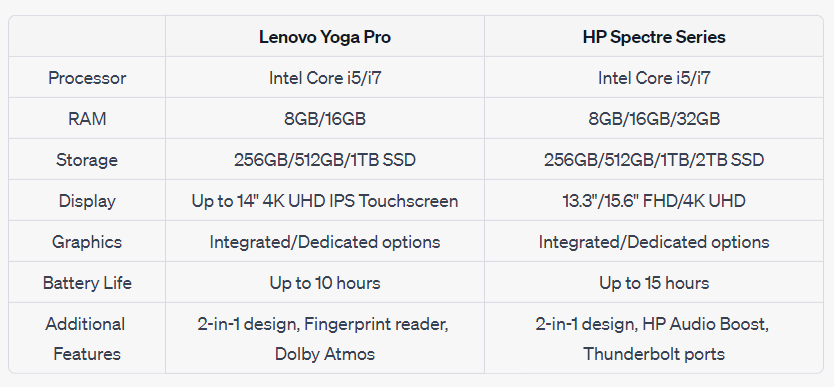
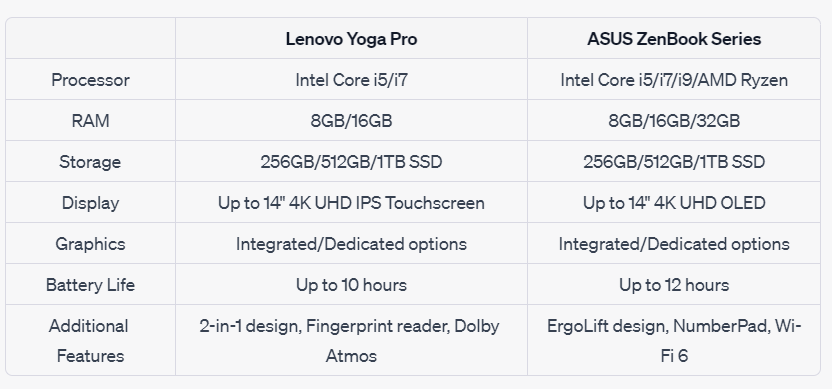
While specific specs can vary depending on the model, some of the common features of the Lenovo Yoga Pro Series include:

  • Processor: Intel Core i5 or i7
  • RAM: 8GB to 16GB
  • Storage: SSD options ranging from 256GB to 1TB
  • Display: Up to 14″ 4K UHD (3840 x 2160) IPS Touchscreen
  • Graphics: Intel Integrated or dedicated graphics options
  • Battery Life: Up to 10 hours
  • Additional Features: Fingerprint reader, backlit keyboard, Wi-Fi 6, USB Type-C and HDMI ports, Dolby Atmos speaker system

3.4. Pros and Cons

Every laptop series has its strengths and weaknesses, and the Lenovo Yoga Pro series is no exception. On the plus side, the series offers high performance, a beautiful design, and exceptional flexibility. On the downside, the series is known for being a bit pricey compared to similar spec laptops from other brands, and the high-resolution display options can drain the battery faster.

Comparative Analysis

In this section, we compare the Lenovo Yoga Pro series with the Apple MacBook Pro series, Dell XPS series, HP Spectre series, and ASUS ZenBook series. The comparison will be made on several key points, including processing power, memory, storage, display quality, and more.

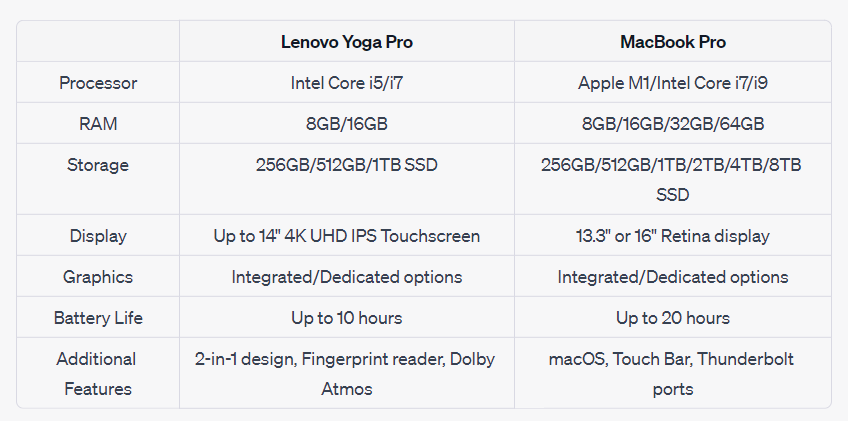
4.1 Lenovo Yoga Pro vs. MacBook Pro

The MacBook Pro is Apple’s flagship laptop series, renowned for its top-tier performance, elegant design, and macOS.

In comparison, the MacBook Pro offers more options for RAM and storage and boasts superior battery life. However, the Lenovo Yoga Pro series offers the flexibility of a 2-in-1 design, which the MacBook Pro does not.

Lenovo Yoga Pro vs. Top Laptops: A Comprehensive Comparison

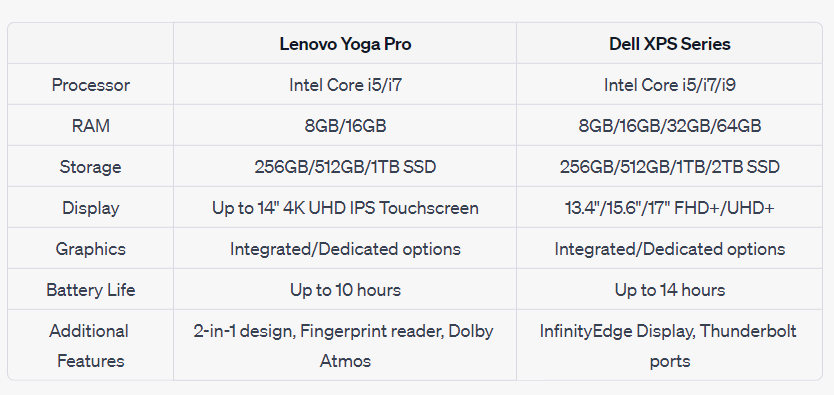
4.2 Lenovo Yoga Pro vs. Dell XPS Series

Dell’s XPS series is often considered a direct competitor to the MacBook Pro, with premium build quality, top-notch specs, and high-performance components.

In this comparison, the Dell XPS Series provides more diverse screen sizes, more powerful processors, and better battery life. Yet, the Lenovo Yoga Pro series stands out with its 2-in-1 design.

4.3 Lenovo Yoga Pro vs. HP Spectre Series

The HP Spectre series represents HP’s line of premium laptops, designed with an elegant aesthetic, powerful performance, and an array of high-end features.

In this case, both laptops are pretty competitive, with both offering a 2-in-1 design. The Spectre series offers a longer battery life and HP Audio Boost, but Lenovo’s Yoga Pro series holds its own with Dolby Atmos audio.

4.4 Lenovo Yoga Pro vs. ASUS ZenBook Series

The ASUS ZenBook series is known for its stylish design, excellent performance, and top-tier displays.

The ASUS ZenBook series offers an ErgoLift design for comfortable typing and an integrated NumberPad on some models. However, Lenovo’s Yoga Pro series keeps up with its 2-in-1 versatility and Dolby Atmos audio.

Lenovo Yoga Pro vs. Top Laptops: A Comprehensive Comparison

Consumer Perspectives

Understanding consumer perspectives is a crucial part of any product analysis. Consumer reviews, ratings, and feedback provide real-life insights into the performance, durability, and user-friendliness of a product. In this section, we will consider the consumer perspectives on the Lenovo Yoga Pro series and its competitors.

5.1 Market Response and Customer Reviews

Across the board, the Lenovo Yoga Pro series has been well-received by consumers, garnering praise for its 2-in-1 design, impressive display, and overall performance. Users also appreciate the robust build quality and the flexibility offered by the convertible design. However, some users have pointed out that the high-end models are quite pricey.

Similarly, the MacBook Pro, Dell XPS Series, HP Spectre Series, and ASUS ZenBook Series have all received positive feedback from consumers. MacBook Pro users often cite the seamless integration with other Apple devices and the device’s performance as significant pros. Dell XPS is praised for its design and high-quality display, while HP Spectre gains points for its stylish design and impressive battery life. Users of the ASUS ZenBook Series often highlight the device’s unique design features, such as the ErgoLift hinge and NumberPad.

5.2 Use Cases and Real-Life Applications

The use cases for these laptops are varied. For instance, the Lenovo Yoga Pro series, with its 2-in-1 design, is excellent for users who value flexibility and portability. It’s suitable for professionals who often make presentations, designers who appreciate the touchscreen and stylus support, and students who need a versatile device for their studies.

On the other hand, the MacBook Pro is a favorite among professionals in creative industries due to its powerful performance and high-quality display. The Dell XPS Series and HP Spectre Series are versatile laptops suited to both professional and personal use, thanks to their combination of performance, design, and build quality. The ASUS ZenBook Series, with its unique features like the ErgoLift hinge and NumberPad, offers a great user experience for both office and home users.

5.3 User Satisfaction Analysis

User satisfaction largely depends on whether a product meets or exceeds its promised performance and functionality. Overall, users of the Lenovo Yoga Pro series have reported high levels of satisfaction, particularly praising the flexibility, build quality, and performance. Similarly, users of the MacBook Pro, Dell XPS Series, HP Spectre Series, and ASUS ZenBook Series have expressed satisfaction with their devices, citing various reasons, including performance, design, display quality, and unique features.

Choosing the Right Laptop: Factors to Consider

Choosing a laptop involves careful consideration of your needs, budget, and preferences. Here are some factors to consider:

6.1 Performance

Consider what you will be using the laptop for. If you require a laptop for graphic design, video editing, or gaming, you may need a laptop with a powerful processor, ample RAM, and dedicated graphics. On the other hand, if you need a laptop for basic tasks like browsing the web, using office applications, or streaming content, a laptop with less powerful specifications might be enough.

6.2 Design

If portability and flexibility are important to you, you might want to consider 2-in-1 laptops like the Lenovo Yoga Pro or HP Spectre series. If you prefer a traditional clamshell design, then the MacBook Pro, Dell XPS, or ASUS ZenBook might be more suitable.

6.3 Operating System

Your choice might also depend on the operating system you prefer. If you’re used to macOS and enjoy its seamless integration with other Apple devices, then the MacBook Pro would be an obvious choice. If you prefer Windows, then you have a wider array of choices.

6.4 Budget

Lastly, consider your budget. Make sure to choose a laptop that offers the best balance of performance and cost for your specific needs.

The Lenovo Yoga Pro series is a line of 2-in-1 laptops known for their versatility, performance, and sleek design. However, when compared to other top laptop series like the Apple MacBook Pro, Dell XPS, HP Spectre, and ASUS ZenBook, the choice isn’t straightforward. Each of these laptops offers unique features and advantages. Your choice should ultimately depend on your specific needs, preferences, and budget.

This comprehensive comparison should serve as a starting point for you to make an informed decision when choosing between the Lenovo Yoga Pro series and other top laptop brands.

Posted on

Dell XPS 17: A Comprehensive Review of Power and Portability

Dell XPS 17: A Comprehensive Review of Power and Portability

The Dell XPS 17 (9710) is the latest addition to Dell’s XPS series and is considered a remarkable breakthrough in the realm of laptop technology. Aimed primarily at creators and power users who require a high-performance device that matches the portability of a laptop, it boasts an array of features and specifications to cater to a range of uses. This article will delve into the comprehensive analysis of the XPS 17, shedding light on its specifications, performance, features, and how it stacks up against its competitors.

History of Dell XPS series

Dell’s XPS (Xtreme Performance System) line has been a trusted series in the laptop market for decades. Originally introduced in 1990, the XPS series was designed to embody the best in PC technology. Over the years, the series has evolved significantly, with each iteration pushing the boundaries of performance and design.

YearKey Milestones
1990Introduction of the XPS series
2001Launch of the first XPS laptop
2005Separation into two lines: for gaming and for performance
2007Rebranding of the gaming line to Alienware
2010XPS 13, the smallest 13-inch laptop, launched
2020Launch of XPS 17 after a decade’s hiatus
Dell XPS 17: A Comprehensive Review of Power and Portability

Specifications of Dell XPS 17

The Dell XPS 17 is a showcase of top-tier hardware and refined design, balancing both power and portability.

1 Display

The Dell XPS 17 comes with a 17-inch display, offering two resolution options: Full HD+ (1920 x 1200) and UHD+ (3840 x 2400). The InfinityEdge touch display provides a nearly borderless viewing experience, and the 500-nit panel delivers vibrant colors and deep blacks, crucial for video editing and graphic design tasks.

2 Processor

Depending on your choice, the Dell XPS 17 can be equipped with various 10th or 11th Gen Intel Core processors. This flexibility allows the laptop to cater to different user needs, from basic productivity tasks to intense computational workloads.

3 RAM and Storage

You can configure the Dell XPS 17 with up to 64GB DDR4 RAM and up to 4TB PCIe SSD for storage. Such massive storage and memory options are a boon for professionals dealing with large files and demanding applications.

4 Graphics

The Dell XPS 17 comes with NVIDIA GeForce RTX 3050 or 3060 graphics options. These GPUs, along with the powerful processors, make the laptop an excellent choice for gaming and graphic-intensive tasks. They also support Ray Tracing and DLSS, technologies that further enhance the laptop’s graphics performance.

5 Battery Life

One of the key selling points of the Dell XPS 17 is its battery life. Depending on the use case, the laptop’s 97WHr battery can last up to 14 hours on a single charge. This makes it an excellent companion for those who work on the go.

6 Ports and Connectivity

The Dell XPS 17 features a total of four Thunderbolt 4 ports (with power delivery), a full-size SD card reader, and a 3.5mm headphone/microphone combo jack. For wireless connectivity, it offers Killer Wi-Fi 6 and Bluetooth 5.1.

CategorySpecifications
Display17-inch, Full HD+ or UHD+, InfinityEdge Touch Display
Processor10th/11th Gen Intel Core options
RAMUp to 64GB DDR4
StorageUp to 4TB PCIe SSD
GraphicsNVIDIA GeForce RTX 3050/3060
Battery LifeUp to 14 hours
Ports4 Thunderbolt 4, SD Card Reader, 3.5mm Audio Jack
Dell XPS 17: A Comprehensive Review of Power and Portability

Performance and User Experience

1 Everyday Use

With its impressive specs, the Dell XPS 17 performs exceptionally well in daily tasks. From browsing with multiple tabs open to running productivity software like Microsoft Office, the laptop handles it all smoothly. The high-resolution display makes watching videos and browsing photos a delight.

2 Gaming and Media Creation

The Dell XPS 17, with its powerful processor and GPU, is well-equipped to handle gaming and media creation tasks. It can run most modern games smoothly at medium to high settings. For creators, video editing software like Adobe Premiere Pro runs without hiccups, and the high-resolution display ensures accurate color representation.

Software and Features

1 Pre-installed Software

The Dell XPS 17 comes with Windows 10 Home or Pro, providing familiar navigation and built-in security features. Additionally, Dell includes a suite of applications such as Dell Power Manager, which lets you customize your power settings for optimal performance and battery use.

2 Special Features

The XPS 17 includes several notable features. The Waves MaxxAudio Pro boosts volume and clarifies every tone, enhancing your audio experience. The laptop also comes with a fingerprint reader integrated into the power button for easy and secure access.

Comparisons with Competing Models

1 Dell XPS 17 vs MacBook Pro

The Dell XPS 17 and the Apple MacBook Pro are both top-tier laptops targeted towards power users. The MacBook Pro comes with Apple’s M1 chip, which delivers impressive performance, but the XPS 17’s configurability with different Intel processors and NVIDIA GPUs offers more options to the user.

CategoryDell XPS 17MacBook Pro
Processor10th/11th Gen Intel Core optionsM1 Chip
GraphicsNVIDIA GeForce RTX 3050/30608-core GPU
Display17″ Full HD+ or UHD+16″ Retina Display
RAMUp to 64GB DDR4Up to 16GB
StorageUp to 4TB PCIe SSDUp to 2TB SSD
Battery LifeUp to 14 hoursUp to 20 hours
PriceVaries based on configurationStarts at $2399

2 Dell XPS 17 vs Lenovo Yoga

The Lenovo Yoga series is another competitor, with the Yoga 9i being a standout model. The Yoga 9i comes with a unique rotating soundbar hinge, and it’s also a 2-in-1 device, but the XPS 17 offers a larger display and more powerful specifications.

CategoryDell XPS 17Lenovo Yoga 9i
Processor10th/11th Gen Intel Core optionsUp to 11th Gen Intel Core i7
GraphicsNVIDIA GeForce RTX 3050/3060Integrated Intel Graphics
Display17″ Full HD+ or UHD+14″ Full HD or UHD
RAMUp to 64GB DDR4Up to 16GB DDR4
StorageUp to 4TB PCIe SSDUp to 1TB PCIe SSD
Battery LifeUp to 14 hoursUp to 18 hours
PriceVaries based on configurationStarts at $1349

Pros and Cons

Pros:

  • Stunning 17-inch display with optional 4K resolution
  • Robust performance with Intel 10th/11th Gen processors
  • NVIDIA RTX graphics
  • Up to 14 hours of battery life
  • Minimalistic, high-quality design

Cons:

  • Can get hot under heavy load
  • No HDMI or USB-A ports
  • High-end configurations can be expensive
Dell XPS 17: A Comprehensive Review of Power and Portability

Conclusion

The Dell XPS 17 is a high-performance laptop that offers a compelling mix of power, portability, and aesthetics. It’s equipped to handle everything from everyday tasks to intense computational workloads, making it an excellent choice for power users. With its stunning display, robust build quality, and impressive battery life, it’s a standout laptop in its category. While it comes with a steep price tag, the XPS 17 delivers on its promise of performance and quality, making it a worthy investment for those in need of a powerhouse portable machine.

Posted on

Comprehensive Guide to Server Power Supply Conversion

Comprehensive Guide to Server Power Supply Conversion

Server power supplies are crucial components of any network. They provide the energy needed to run servers, which are the workhorses of modern information systems. However, there can be instances when it becomes necessary or advantageous to convert these server power supplies. This could be due to reasons like repurposing old server hardware, saving costs, or meeting unique power requirements that conventional power solutions cannot satisfy.

While server power supply conversion may seem daunting, with a careful approach and a keen understanding of the hardware, it’s a process that can be executed with precision. In this comprehensive guide, we aim to demystify the process and provide you with a step-by-step guide to converting server power supplies.

II. Understanding Server Power Supplies

A. Types of Server Power Supplies

There are several types of server power supplies, but the most commonly used are the AC and DC power supplies.

TypeDescription
AC Power SuppliesAlternating Current (AC) power supplies are the most common types found in most servers. They convert AC voltage from the main power source to the direct current (DC) required by the computer components.
DC Power SuppliesDirect Current (DC) power supplies are less common and typically used in specific applications. They receive DC voltage input and regulate it to the required levels for the server components.

B. Technical Specifications of Server Power Supplies

When working with server power supplies, it’s crucial to understand their technical specifications. This includes the input voltage, output voltage, current rating, efficiency, and more. Understanding these specifications will help you in the conversion process.

SpecificationDescription
Input VoltageThe voltage that the power supply requires from the power source.
Output VoltageThe voltage that the power supply provides to the computer components.
Current RatingThe maximum current that the power supply can provide.
EfficiencyThe percentage of input power that is effectively converted into output power.

C. Server Power Supply vs Regular Power Supply

Server power supplies are specifically designed to meet the rigorous demands of server environments. They often have higher efficiency ratings, better cooling mechanisms, and more robust designs than regular power supplies. They are also typically more expensive due to these advanced features. However, for certain applications, it can be more cost-effective and beneficial to convert server power supplies instead of purchasing new ones.

Comprehensive Guide to Server Power Supply Conversion

III. When and Why to Convert Server Power Supplies

A. Scenarios for Conversion

Several situations might necessitate the conversion of server power supplies. Below are some of the most common:

  1. Repurposing Old Server Hardware: Often, companies upgrade their servers, leaving old but functional hardware behind. These power supplies can be converted for various purposes such as powering 3D printers, amateur radio equipment, or other high power electronic devices.
  2. Cost-Saving: Server power supplies are generally more efficient and reliable than consumer-grade power supplies, and you can often find used ones at a fraction of the price of new, standard power supplies.
  3. Custom Power Requirements: Sometimes, you may need a power supply with specific characteristics that are not readily available in the market. In such cases, converting a server power supply can be a great solution.
ScenariosExplanation
Repurposing Old Server HardwareTo utilize functional hardware left behind after server upgrades.
Cost-SavingServer power supplies are generally more efficient and cheaper than new consumer-grade power supplies.
Custom Power RequirementsWhen there’s a need for power supplies with specific characteristics not readily available.

B. Benefits of Conversion

The conversion of server power supplies comes with several benefits:

  1. Efficiency: Server power supplies are designed for maximum efficiency, which can lead to significant energy savings over time.
  2. Reliability: Server components, including power supplies, are made to operate 24/7 for many years, making them exceptionally reliable.
  3. Cost-effective: Especially when utilizing old or second-hand server power supplies, the cost of conversion can be considerably less than purchasing new equipment.
BenefitsExplanation
EfficiencyServer power supplies are designed for maximum efficiency leading to energy savings.
ReliabilityServer components are made to operate 24/7 making them exceptionally reliable.
Cost-effectiveConversion of old or second-hand server power supplies is less costly than new equipment.
Comprehensive Guide to Server Power Supply Conversion

IV. How to Safely Handle Server Power Supplies

A. Precautions and Safety Measures

Safety is paramount when working with any electrical equipment, including server power supplies. Here are some key safety measures:

  1. Unplug the Power Supply: Always ensure the power supply is unplugged before you start working on it.
  2. Avoid Physical Contact with Internal Components: Do not touch any internal components with bare hands, especially when the power supply is plugged in.
  3. Use Protective Gear: Always wear protective gear, including gloves and eye protection, when working with power supplies.
  4. Work in a Well-Ventilated Area: Power supplies can get hot, so make sure your workspace is well-ventilated.
  5. Have a Fire Extinguisher Handy: This is a necessary safety measure when working with any electrical equipment.

B. Required Tools and Equipment

Different conversion projects may require different tools. However, some of the most common tools required include:

  1. Multimeter: To measure voltage and current.
  2. Soldering Iron: For any required soldering.
  3. Wire Cutters/Strippers: To cut and strip wires.
  4. Screwdrivers: To open the power supply case.
  5. Heat Shrink Tubing and Lighter: To insulate any exposed connections.
ToolUse
MultimeterTo measure voltage and current.
Soldering IronFor any required soldering.
Wire Cutters/StrippersTo cut and strip wires.
ScrewdriversTo open the power supply case.
Heat Shrink Tubing and LighterTo insulate any exposed connections.

. Step by Step Guide to Convert Server Power Supplies

Before proceeding, ensure that you have the necessary safety measures in place and that your work area is properly prepared.

A. Preparation Steps

  1. Understanding the Power Supply Specifications: Take note of the specifications of the power supply, including input and output voltage, current rating, and efficiency.
  2. Gathering the Necessary Tools and Materials: Based on the specific power supply and your conversion needs, gather the necessary tools and materials.

B. Detailed Conversion Process

  1. Open the Power Supply: Using the screwdriver, carefully open the power supply. Be careful not to touch any internal components to avoid electrical shock.
  2. Identify the Output Wires: Locate the output wires. These are usually color-coded: yellow for 12V, red for 5V, and black for ground.
  3. Prepare the Output Wires: Using the wire cutters and strippers, cut and strip the output wires to the desired length.
  4. Solder the Output Wires to the Desired Output Connector: If necessary, solder the output wires to the connector that matches your needs. For example, for a 12V output, solder the yellow and black wires to a suitable 12V connector.
  5. Insulate the Connections: Using heat shrink tubing and a lighter, insulate the connections to prevent short circuits.
  6. Test the Converted Power Supply: Use the multimeter to confirm that the converted power supply is outputting the correct voltage and current.
  7. Close the Power Supply: After confirming that everything is working correctly, carefully close the power supply.

C. Post-conversion Steps

  1. Run a Full Load Test: After the initial test, run a full load test to confirm that the converted power supply can handle the maximum current for an extended period.
  2. Install the Converted Power Supply: Now, you can install the converted power supply in its intended application.
StepDescription
Open the Power SupplyOpen the power supply casing without touching any internal components.
Identify the Output WiresLocate the output wires which are usually color-coded.
Prepare the Output WiresCut and strip the output wires to the desired length.
Solder the Output WiresSolder the output wires to the connector that matches your needs.
Insulate the ConnectionsInsulate the connections using heat shrink tubing.
Test the Converted Power SupplyUse a multimeter to test the output voltage and current.
Close the Power SupplyAfter testing, close the power supply.
Run a Full Load TestRun a full load test to confirm stability.
Install the Converted Power SupplyInstall the converted power supply in its intended application.
Comprehensive Guide to Server Power Supply Conversion

VI. Troubleshooting Common Conversion Issues

No matter how carefully you proceed, you may run into a few hitches along the way. Here are common issues you may encounter during the conversion of server power supplies, and suggested solutions.

A. Common Problems and Solutions

ProblemSolution
Power Supply Does Not StartMany server power supplies need a load on their output to start. Try connecting a small load like a 10-ohm resistor across the output.
Incorrect Output VoltageEnsure you have identified the correct output wires. Refer to the power supply documentation or look for color-coding.
Power Supply Shuts Down Under LoadThis could be a sign that the power supply is overloaded. Ensure that your load does not exceed the power supply’s rated current.
Power Supply OverheatsEnsure adequate ventilation. If the problem persists, the power supply may be faulty.

B. Tips for Successful Conversion

  1. Always refer to the power supply’s documentation or seek professional advice if unsure.
  2. Regularly test the power supply during the conversion process.
  3. Use quality tools and materials to ensure a safe and reliable conversion.

VII. Case Studies on Server Power Supply Conversion

A. Case Study 1

In an example of successful server power supply conversion, a hobbyist running a 3D printing workshop managed to repurpose old server power supplies to power his array of 3D printers. He documented his process, which largely aligns with the steps described in this guide. The conversion allowed him to save on the cost of buying new power supplies and to repurpose otherwise obsolete server components.

B. Case Study 2

Another interesting case involves a radio amateur who needed a reliable and affordable power supply for his radio equipment. He converted a server power supply to meet his requirements. He particularly praised the reliability and efficiency of the converted power supply, which surpassed those of the consumer-grade power supplies he previously used.

VIII. Conclusion

Server power supply conversion can be a practical, cost-effective, and environmentally-friendly solution in several scenarios. Whether you’re repurposing old server hardware, aiming to save costs, or need a custom power supply for a unique application, conversion of server power supplies can be an ideal solution. The process might seem daunting at first, but with the right approach and careful attention to detail, you can successfully convert a server power supply to meet your specific needs.

In the future, as we continue to strive for efficiency and sustainability in technology, the practice of converting server power supplies may become even more common. For anyone with an interest in electronics or hardware, understanding this process and its benefits can be an invaluable skill.

Remember, safety is paramount when working with electrical components. Always take necessary precautions and don’t hesitate to seek professional help if you encounter issues beyond your expertise.

Posted on

Ultimate Student Laptop Guide 2023: Top 6 Picks for Every Budget

Ultimate Student Laptop Guide 2023: Top 6 Picks for Every Budget

With advancements in technology becoming increasingly pervasive in our daily lives, students, now more than ever, require reliable computing devices for their academic pursuits. From writing assignments and researching complex topics to attending online lectures and engaging in collaborative projects, a laptop is a student’s essential tool. This article aims to provide a comprehensive guide on the top six best laptops for students in 2023, providing an in-depth analysis to help you make the best decision based on your needs and budget.

Understanding Laptop Specifications

Before delving into the specific models, it’s important to understand the basic specifications of a laptop and what they mean for its performance. Here’s a quick run-through of the most crucial components:

ComponentDescription
Processor (CPU)This is the brain of the laptop, controlling all the tasks your computer can accomplish.
RAM (Memory)RAM stores short-term data while your laptop is running tasks. More RAM generally means better multitasking capabilities.
StorageThis includes HDDs and SSDs, which store your software, documents, and media. SSDs are faster but more expensive.
Graphics (GPU)This handles image rendering. A good GPU is essential for tasks like video editing or gaming.
Battery LifeThis determines how long your laptop can function without being plugged into power.
Screen Size and ResolutionThese affect how much content you can fit on the screen at once, and how sharp and color-accurate the display is.
Ultimate Student Laptop Guide 2023: Top 6 Picks for Every Budget

Top 6 Best Laptops for Students in 2023

Let’s now delve into the primary focus of this guide, reviewing the best student-friendly laptops on the market in 2023. In making this selection, we considered several factors such as performance, build quality, battery life, and value for money.

1 Apple MacBook Pro M1

Apple’s MacBook Pro with the M1 chip has made a significant impact in the computing world due to its revolutionary architecture and impressive performance.

SpecificationDetail
ProcessorApple M1 Chip
RAM8GB/16GB
Storage256GB/512GB/1TB/2TB SSD
GraphicsIntegrated 8-core GPU
Battery LifeUp to 20 hours
Screen Size13.3-inch, 2560 x 1600 Retina Display

Pros:

  • Outstanding performance with the M1 chip
  • Excellent battery life
  • High-quality Retina Display

Cons:

  • Expensive
  • Limited port selection

The MacBook Pro M1 is suitable for students who prioritize performance and have a higher budget. Its processing power is ideal for multitasking and handling software needed for design, coding, and video editing courses.

2 Dell XPS 13

The Dell XPS 13 has consistently been a top choice due to its sleek design, robust performance, and portability.

SpecificationDetail
ProcessorIntel Core i5/i7
RAM8GB/16GB
Storage256GB/512GB/1TB/2TB SSD
GraphicsIntel Iris Plus
Battery LifeUp to 12 hours
Screen Size13.4-inch, 1920 x 1200 or 3840 x 2400

Pros:

  • Compact, sleek design
  • Sharp, vibrant display
  • Solid performance

Cons:

  • Can get expensive with higher configurations
  • Limited port options

The Dell XPS 13 is a great all-rounder, providing a balance between performance, size, and price. It’s especially suitable for students who require a portable laptop without sacrificing performance.

3 HP Envy X360

The HP Envy X360 offers excellent versatility with its 2-in-1 design, allowing it to be used as both a laptop and a tablet, providing students with a flexible tool for both work and play.

SpecificationDetail
ProcessorAMD Ryzen 5/7
RAM8GB/16GB
Storage256GB/512GB SSD
GraphicsIntegrated AMD Radeon Graphics
Battery LifeUp to 11 hours
Screen Size13.3-inch, 1920 x 1080 Touchscreen Display

Pros:

  • Versatile 2-in-1 design
  • Excellent performance with AMD Ryzen CPUs
  • Good value for money

Cons:

  • Average battery life
  • Display could be brighter

The HP Envy X360 is a great choice for students looking for versatility and value. Its 2-in-1 design makes it ideal for note-taking, drawing, or other creative tasks, while still being capable enough to handle day-to-day academic workloads.

4 Acer Swift 3

The Acer Swift 3 strikes a balance between affordability and performance, making it an excellent choice for students on a budget without compromising on necessary features.

SpecificationDetail
ProcessorAMD Ryzen 5/7
RAM8GB
Storage256GB/512GB SSD
GraphicsIntegrated AMD Radeon Graphics
Battery LifeUp to 11 hours
Screen Size14-inch, 1920 x 1080

Pros:

  • Great value for money
  • Strong performance with AMD Ryzen CPUs
  • Lightweight and portable

Cons:

  • Display quality is mediocre
  • Build quality could be better

The Acer Swift 3 is ideal for students who need a capable laptop for general academic use and are working with a tight budget. It offers decent performance for its price, handling everyday tasks with ease.

5 Asus ZenBook 13

The Asus ZenBook 13 is a compact, lightweight laptop that does not compromise on performance. It’s a perfect companion for students who value mobility and productivity.

SpecificationDetail
ProcessorIntel Core i5/i7
RAM8GB/16GB
Storage256GB/512GB/1TB SSD
GraphicsIntel Iris Xe Graphics
Battery LifeUp to 13 hours
Screen Size13.3-inch, 1920 x 1080

Pros:

  • Compact and lightweight
  • Good performance with Intel Core CPUs
  • Comfortable keyboard and touchpad

Cons:

  • No Thunderbolt 4 support
  • Limited port selection

The Asus ZenBook 13 is an excellent choice for students frequently on the move. It’s lightweight yet sturdy, with a solid performance to handle most academic tasks. Its comfortable keyboard also facilitates long typing sessions.

6 Lenovo ThinkPad X1 Carbon

The Lenovo ThinkPad X1 Carbon is renowned for its robust build quality and excellent keyboard. It’s a laptop that blends functionality and durability, making it ideal for demanding academic environments.

SpecificationDetail
ProcessorIntel Core i5/i7
RAM8GB/16GB
Storage256GB/512GB/1TB SSD
GraphicsIntel Iris Xe Graphics
Battery LifeUp to 15 hours
Screen Size14-inch, 1920 x 1080 or 3840 x 2160

Pros:

  • Durable, premium build
  • Excellent keyboard and touchpad
  • Good performance with Intel Core CPUs

Cons:

  • High price point
  • Mediocre speakers

The Lenovo ThinkPad X1 Carbon is perfect for students who anticipate heavy use of their laptops and value a sturdy, reliable machine. Despite its higher price point, its premium features and durability offer long-term value.

Ultimate Student Laptop Guide 2023: Top 6 Picks for Every Budget

Laptop Buying Guide for Students

Choosing a laptop can be a daunting task, especially considering the range of options available. Here are a few key factors to consider when purchasing a laptop for academic purposes:

  1. Performance: Consider what you’ll be using the laptop for. If you’re into heavy-duty tasks like video editing, gaming, or programming, you’ll need a laptop with a powerful CPU, a good GPU, and plenty of RAM. For general tasks like web browsing and document editing, a budget-friendly laptop with moderate specifications should suffice.
  2. Portability: If you travel a lot or commute to school, a lightweight and compact laptop would be ideal. 13 to 14-inch laptops usually strike a good balance between usability and portability.
  3. Battery Life: For students, a long battery life is crucial. Look for laptops that can last at least 8 hours on a single charge, so you don’t have to worry about finding a power outlet during the day.
  4. Budget: Set a budget and try to find the best laptop within that range. Don’t just go for the cheapest option; consider the laptop’s durability, performance, and how well it meets your needs.
  5. Operating System: Choose an operating system you’re comfortable with. The three main options are Windows, MacOS, and Chrome OS.
  6. Warranty and After-sales Service: Check the warranty period and what it covers. Good after-sales service is a big plus, as it ensures you can get help if any issues arise with the laptop.

5. Frequently Asked Questions

5.1 What specifications should I prioritize as a student?

As a student, the most important laptop features will depend on your specific needs. However, in general, a good balance between processor speed, RAM, storage, and battery life should serve most students well.

5.2 Should I buy a laptop with a dedicated graphics card?

Unless you’re into gaming, video editing, or other graphics-intensive tasks, an integrated graphics card should suffice for typical academic work.

5.3 Is a touch screen necessary for a student’s laptop?

A touchscreen can be a useful feature for tasks like note-taking, drawing, and flipping through documents, but it’s not a necessity. Non-touchscreen laptops often have better battery life and are less expensive.

5.4 Mac vs Windows for students: which is better?

This largely depends on personal preference and budget. Macs are generally more expensive but offer excellent performance, build quality, and user experience. Windows laptops are more varied in specs and prices, offering a wider selection to suit different needs and budgets.

5.5 How much should I spend on a laptop as a student?

This is subjective and depends on your specific needs and budget. As a rough guide, a budget of $500-$1000 should get you a solid laptop for general academic use. For more demanding tasks or premium features, you may need to spend upwards of $1000.

Ultimate Student Laptop Guide 2023: Top 6 Picks for Every Budget

6. Conclusion

Choosing the right laptop can significantly enhance your academic experience. Each of the laptops reviewed in this guide offers a unique blend of performance, portability, and price, catering to a diverse range of needs and budgets. It’s essential to consider your specific needs and preferences when making a decision. While this guide provides a comprehensive overview of the top laptops for students in 2023, further research, such as reading user reviews and testing the laptop in person, can also be beneficial. Ultimately, the best laptop is the one that fits your personal and academic needs perfectly.

Posted on

Top 6 Office Laptops under $2000 for 2023

Top 6 Office Laptops under $2000 for 2023

I. Introduction

In the ever-evolving landscape of technology, the right laptop can make or break your productivity, especially in a professional environment. As we navigate through 2023, it’s clear that the world of office laptops has grown by leaps and bounds, offering a myriad of options for the discerning professional. The market is saturated with top-notch devices, each touting unique features and specifications that promise to make your work life not just easier, but more efficient and even enjoyable.

Choosing the right office laptop is much more than just looking at the price tag. It’s about understanding your professional needs, and then matching them to the most suitable hardware and software features. Whether it’s robust performance for complex tasks, outstanding battery life for those on-the-go, a stunning display for design work, or a durable build for long-term use, there’s a laptop out there that fits the bill.

While there are a plethora of options to choose from, our focus in this article is on the top-tier office laptops available under $2000. We have carefully curated a list of the top 6 best office laptops within this price range for 2023. These are Dell XPS 15, HP Spectre x360 15t, Apple MacBook Pro 13-inch, Lenovo ThinkPad X1 Carbon (9th Gen), ASUS ZenBook Pro Duo UX581, and Microsoft Surface Laptop 4. This comprehensive guide aims to help you make an informed decision, ensuring you get the best value for your investment.

Let’s delve deeper into the world of high-performance laptops, discussing each model’s specifications, pros, and cons. But first, let’s talk about what you should look for when shopping for an office laptop under $2000.

Top 6 Office Laptops under $2000 for 2023

II. What to Look for in an Office Laptop Under $2000

When considering the purchase of an office laptop, especially in the higher price range of under $2000, there are certain key features to focus on. These are:

1. Performance:

When we talk about performance, we refer to the overall speed and efficiency of the laptop. This depends largely on the CPU (Central Processing Unit), the GPU (Graphics Processing Unit), the RAM (Random Access Memory), and the storage type and capacity. An efficient laptop should have a multi-core processor, a powerful GPU (especially for graphics-related tasks), at least 16GB RAM for smooth multitasking, and a fast SSD (Solid-State Drive) for storage.

2. Battery Life:

For professionals constantly on the move, a laptop with long battery life is crucial. A laptop that can provide 8 to 10 hours of battery life on a single charge is considered above average.

3. Display Quality:

A sharp, bright display is a must for tasks like graphic design, video editing, and even for everyday tasks like document editing or internet browsing. The minimum resolution you should consider is 1920×1080 (Full HD), although 4K displays are increasingly common and provide a sharper image.

4. Durability:

Given that this is a significant investment, you’d want a laptop that can last. Look for models with sturdy builds, usually featuring metal (aluminium or magnesium alloy) chassis. Brands like Lenovo’s ThinkPad series are known for their durability and are tested against various conditions to ensure they can survive falls, spills, and extreme temperatures.

5. Portability:

If you frequently travel for work, you’ll need a laptop that’s light and thin enough to carry around comfortably. Anything under 4 pounds (around 1.8 kilograms) is considered lightweight in the laptop world.

6. Keyboard and Trackpad Quality:

Since you’ll likely be typing and navigating your laptop a lot, having a comfortable, responsive keyboard and trackpad is essential. Look for well-spaced keys with good travel, and a smooth, responsive trackpad.

Keep these considerations in mind as we discuss the specifications, pros, and cons of the top 6 office laptops under $2000 for 2023.

III. Review of the Top 6 Office Laptops under $2000 in 2023

III. Review of the Top 6 Office Laptops under $2000 in 2023

  1. 1. Dell XPS 15

The Dell XPS 15 has long been a favorite among professionals for its excellent balance of power, portability, and price.

Specifications:

  • Processor: Intel Core i7-10750H
  • RAM: 16GB DDR4
  • Storage: 1TB SSD
  • Display: 15.6″ 4K UHD+ (3840 x 2400) InfinityEdge Touch Display
  • GPU: NVIDIA GeForce GTX 1650 Ti
  • Weight: 4.5 lbs
  • Battery Life: Up to 8 hours

Pros:

  • Exceptional 4K display for vivid and sharp images
  • High-performance processor for efficient multitasking
  • Large and fast SSD storage

Cons:

  • Slightly heavy compared to others in the category
  • Battery life could be better

2. HP Spectre x360 15t

The HP Spectre x360 15t is a versatile choice for professionals seeking a device that offers the power of a laptop with the convenience of a tablet.

Specifications:

  • Processor: Intel Core i7-9750H
  • RAM: 16GB DDR4
  • Storage: 512GB SSD
  • Display: 15.6″ 4K UHD (3840 x 2160) touch display
  • GPU: NVIDIA GeForce GTX 1650 Ti
  • Weight: 4.79 lbs
  • Battery Life: Up to 7 hours

Pros:

  • 2-in-1 design for flexibility
  • Bright and colorful 4K display
  • Robust build and high-quality keyboard

Cons:

  • Heavier than other laptops
  • Battery life could be improved

3. Apple MacBook Pro 13-inch

The MacBook Pro 13-inch is a testament to Apple’s reputation for top-notch build quality, exceptional performance, and a stellar display.

Specifications:

  • Processor: Apple M1 chip
  • RAM: 16GB
  • Storage: 512GB SSD
  • Display: 13.3″ Retina Display with True Tone
  • GPU: Apple 8-core GPU
  • Weight: 2.8 lbs
  • Battery Life: Up to 20 hours

Pros:

  • Superb Retina display with accurate color reproduction
  • Exceptional battery life
  • High-performance M1 chip for efficient multitasking and processing
  • Lightweight and portable design

Cons:

  • Limited number of USB-C ports
  • No option for an HDMI or SD card slot

4. Lenovo ThinkPad X1 Carbon (9th Gen)

Lenovo’s ThinkPad X1 Carbon is often hailed as the ultimate business laptop, courtesy of its slim, lightweight design, robust build, and powerful performance.

Specifications:

  • Processor: Intel Core i7-1165G7
  • RAM: 16GB LPDDR4x
  • Storage: 512GB SSD
  • Display: 14″ FHD+ (1920 x 1200) IPS, anti-glare with Dolby Vision™
  • GPU: Integrated Intel Iris Xe Graphics
  • Weight: 2.49 lbs
  • Battery Life: Up to 16 hours

Pros:

  • Excellent keyboard and trackpad
  • Lightweight and durable, with a premium feel
  • Good battery life

Cons:

  • Display is Full HD+ instead of 4K
  • Pricey for its category

5. ASUS ZenBook Pro Duo UX581

The ASUS ZenBook Pro Duo UX581 is a unique offering with its innovative dual-screen design, making it an excellent choice for creatives and multitaskers.

Specifications:

  • Processor: Intel Core i7-10750H
  • RAM: 16GB DDR4
  • Storage: 1TB SSD
  • Display: 15.6″ 4K UHD NanoEdge touchscreen glossy main display + 14″ 4K matte touchscreen
  • GPU: NVIDIA GeForce RTX 2060
  • Weight: 5.5 lbs
  • Battery Life: Up to 5 hours

Pros:

  • Innovative dual-screen design, great for multitasking
  • Powerful performance and graphics capability
  • Large, fast SSD storage

Cons:

  • Relatively heavy
  • Subpar battery life

6. Microsoft Surface Laptop 4

The Microsoft Surface Laptop 4 is known for its stylish design, excellent display, and solid performance, making it a popular choice among professionals.

Specifications:

  • Processor: AMD Ryzen 7 4980U / Intel Core i7-1185G7
  • RAM: 16GB DDR4
  • Storage: 512GB SSD
  • Display: 13.5″ / 15″ PixelSense Display
  • GPU: AMD Radeon Graphics / Intel Iris Xe Graphics
  • Weight: 2.79 lbs / 3.40 lbs
  • Battery Life: Up to 19 hours (AMD) / Up to 17.5 hours (Intel)

Pros:

  • Lightweight and slim design
  • Excellent battery life
  • High-quality PixelSense display

Cons:

  • Limited port selection
  • Can get expensive with higher configurations

IV. Comparison of the Top 6 Office Laptops under $2000

Here is a table that compares the key specifications of the top 6 office laptops under $2000 in 2023.

Laptop ModelProcessorRAMStorageDisplayGPUWeightBattery Life
Dell XPS 15Intel Core i7-10750H16GB1TB SSD15.6″ 4K UHD+ InfinityEdge TouchNVIDIA GeForce GTX 1650 Ti4.5 lbsUp to 8 hrs
HP Spectre x360 15tIntel Core i7-9750H16GB512GB SSD15.6″ 4K UHD TouchNVIDIA GeForce GTX 1650 Ti4.79 lbsUp to 7 hrs
Apple MacBook Pro 13Apple M1 chip16GB512GB SSD13.3″ Retina DisplayApple 8-core GPU2.8 lbsUp to 20 hrs
Lenovo ThinkPad X1 CarbonIntel Core i7-1165G716GB512GB SSD14″ FHD+ IPS, Anti-glareIntegrated Intel Iris Xe Graphics2.49 lbsUp to 16 hrs
ASUS ZenBook Pro Duo UX581Intel Core i7-10750H16GB1TB SSD15.6″ 4K UHD NanoEdge + 14″ 4K MatteNVIDIA GeForce RTX 20605.5 lbsUp to 5 hrs
Microsoft Surface Laptop 4AMD Ryzen 7 4980U / Intel Core i7-1185G716GB512GB SSD13.5″ / 15″ PixelSense DisplayAMD Radeon Graphics / Intel Iris Xe Graphics2.79 lbs / 3.40 lbsUp to 19 hrs (AMD) / Up to 17.5 hrs (Intel)

Now that we have compared the specifications of these laptops, it’s time to wrap up our discussion with some final thoughts and recommendations, helping you to make the best choice for your specific needs.

III. Review of the Top 6 Office Laptops under $2000 in 2023

V. Conclusion and Recommendations

Choosing the right laptop depends largely on your professional needs and work style. While the six laptops we’ve discussed each offer their own unique selling points, they all excel in performance, display quality, and build. Here are our recommendations based on specific professional needs:

  • For High Performance and Vibrant Display: The Dell XPS 15 and ASUS ZenBook Pro Duo UX581 are top picks with their powerful CPUs, substantial RAM, and 4K displays. They offer high performance and vibrant displays that would impress any professional.
  • For Best Battery Life: The Apple MacBook Pro 13-inch and Microsoft Surface Laptop 4 stand out for their exceptional battery life. They can last an entire workday without charging, offering you the freedom to work from anywhere.
  • For Versatility and Convenience: The HP Spectre x360 15t is a perfect blend of power and versatility with its 2-in-1 design. It’s an excellent choice if you want the convenience of a tablet and the performance of a laptop in one device.
  • For Durability and Portability: The Lenovo ThinkPad X1 Carbon is known for its robust build and lightweight design. If you often travel for work and need a laptop that can withstand various conditions, this is the laptop for you.
  • For Creative Professionals: The ASUS ZenBook Pro Duo UX581 with its dual screens offers a unique workspace for multitasking, making it an excellent choice for creative professionals like graphic designers and video editors.
  • For Everyday Professional Use: The Microsoft Surface Laptop 4 and Apple MacBook Pro 13-inch, with their excellent performance, display quality, battery life, and sleek design, make them suitable for everyday professional use.

Choosing a laptop is a significant investment, and making the right decision can have a substantial impact on your productivity and work experience. Remember to consider the key features we discussed: performance, battery life, display quality, durability, and portability.

We hope this guide helps you in making an informed decision and finding the perfect office laptop under $2000 in 2023 that suits your professional needs. Happy shopping!

Posted on

Top 6 Affordable Gaming Notebooks for High-Performance Gaming

Top 6 Affordable Gaming Notebooks for High-Performance Gaming

In a world that’s becoming more digital by the day, gaming notebooks have become a must-have item for both casual and hardcore gamers alike. However, not everyone can afford to splurge on the latest, most advanced models. So, how does one go about finding a budget-friendly option without compromising on performance? This article is here to guide you through the top 6 best budget gaming notebooks currently available on the market. We will evaluate their performance, compare their features, and help you choose the one that suits your needs best.

What Makes a Good Budget Gaming Notebook

Performance Factors

When it comes to gaming notebooks, performance is paramount. The hardware of your gaming notebook should be capable of running your preferred games smoothly. Here are the most critical performance factors to consider when purchasing a gaming notebook:

  • Processor (CPU): This is the brain of the computer, and its performance directly influences the gaming experience. For gaming, you generally want to aim for at least a quad-core processor, although newer games might require more.
  • Graphics Card (GPU): The graphics card handles rendering the images you see on the screen. For games with high-quality graphics, a superior GPU is necessary to avoid lag and glitches.
  • Memory (RAM): RAM temporarily stores data that the CPU can access quickly. Having enough RAM can significantly impact game load times and overall performance.
  • Storage: This affects how many games you can store on your notebook. There are two types of storage: Hard Disk Drives (HDD) and Solid State Drives (SSD). SSDs are much faster, so they’re better for gaming.
Performance FactorMinimum RecommendedIdeal
CPUQuad-core6-core or more
GPUGTX 1650 or equivalentGTX 1660 Ti or higher
RAM8GB16GB or more
Storage500GB HDD500GB or larger SSD

Non-performance Factors

While performance is key, several non-performance factors also contribute to a good gaming experience.

  • Display: For a visually immersive gaming experience, a good display is critical. Consider the screen resolution, refresh rate, and size.
  • Keyboard: A responsive keyboard can drastically improve your gaming experience. Look for keyboards with key travel (the distance keys move when pressed) of at least 1.5mm and actuation (the force required to press a key) of 60 grams or more.
  • Sound: Good sound quality can enhance the gaming experience, especially for games where audio cues are important. If the built-in speakers aren’t up to par, make sure there’s an option to connect external speakers or headphones.
  • Battery Life: While gaming often demands the notebook to be plugged in for maximum performance, a good battery life can be beneficial for lighter tasks on the go.
  • Build Quality and Design: Good build quality ensures your notebook can withstand some wear and tear, and an appealing design can enhance your overall satisfaction.
Non-performance FactorPoints to Consider
DisplayScreen resolution, Refresh rate, Size
KeyboardKey travel, Actuation
SoundBuilt-in speaker quality, External speaker/headphone compatibility
Battery LifeLifespan under normal and gaming conditions
Top 6 Affordable Gaming Notebooks for High-Performance Gaming

Top 6 Best Budget Gaming Notebooks

Gaming notebooks that combine power, performance, and an affordable price tag can seem elusive. However, we have identified six gaming notebooks that can offer a robust gaming experience without breaking the bank.

1. Acer Nitro 5

The Acer Nitro 5 stands out for its exceptional value and performance.

Performance Factors:

Performance FactorAcer Nitro 5 Specifications
CPUIntel Core i5-10300H
GPUNVIDIA GeForce GTX 1650
RAM8GB DDR4
Storage256GB NVMe SSD

Non-performance Factors:

Non-performance FactorAcer Nitro 5 Specifications
Display15.6″ Full HD IPS
KeyboardBacklit, with a dedicated NitroSense Key
SoundAcer TrueHarmony Technology
Battery LifeUp to 8 hours
Build Quality and DesignRed-backlit keyboard, black metal chassis

2. HP Pavilion Gaming 15

HP Pavilion Gaming 15 is a perfect example of an economical gaming notebook, providing impressive performance at a pocket-friendly price.

Performance Factors:

Performance FactorHP Pavilion Gaming 15 Specifications
CPUAMD Ryzen 5 4600H
GPUNVIDIA GeForce GTX 1650
RAM8GB DDR4
Storage256GB NVMe SSD

Non-performance Factors:

Non-performance FactorHP Pavilion Gaming 15 Specifications
Display15.6″ Full HD IPS anti-glare
KeyboardFull-size, island-style, backlit, with numeric keypad
SoundAudio by B&O with dual speakers
Battery LifeUp to 7 hours
Build Quality and DesignMicro-edge bezel design, ultra-thin and light

3. Dell G3 15

Dell G3 15 offers an optimal blend of portability, durability, and performance, catering to gamers who are often on the move.

Performance Factors:

Performance FactorDell G3 15 Specifications
CPUIntel Core i5-10300H
GPUNVIDIA GeForce GTX 1650 Ti
RAM8GB DDR4
Storage512GB NVMe SSD

Non-performance Factors:

Non-performance FactorDell G3 15 Specifications
Display15.6″ Full HD with 120Hz refresh rate
KeyboardBlue backlit, spill-resistant
SoundTwo tuned speakers with Nahimic 3D Audio
Battery LifeUp to 6 hours
Build Quality and DesignRobust design, available in different colors
Top 6 Affordable Gaming Notebooks for High-Performance Gaming

4. Lenovo Legion Y545

The Lenovo Legion Y545 is praised for its clean design and high-quality build, making it an excellent choice for budget gamers who do not want to compromise on aesthetics.

Performance Factors:

Performance FactorLenovo Legion Y545 Specifications
CPUIntel Core i5-9300H
GPUNVIDIA GeForce GTX 1650
RAM8GB DDR4
Storage128GB NVMe SSD + 1TB HDD

Non-performance Factors:

Non-performance FactorLenovo Legion Y545 Specifications
Display15.6″ Full HD IPS anti-glare
KeyboardWhite backlit, with less than 1 ms response time
SoundHarman speakers with Dolby Atmos for Gaming
Battery LifeUp to 5 hours
Build Quality and DesignAluminum build, refined design with thin bezels

5. ASUS TUF Gaming F15

ASUS TUF Gaming F15 is a solid entry into the budget gaming notebook market, offering durable build quality and a respectable gaming performance.

Performance Factors:

Performance FactorASUS TUF Gaming F15 Specifications
CPUIntel Core i5-10300H
GPUNVIDIA GeForce GTX 1650 Ti
RAM8GB DDR4
Storage512GB NVMe SSD

Non-performance Factors:

Non-performance FactorASUS TUF Gaming F15 Specifications
Display15.6″ Full HD IPS with 144Hz refresh rate
KeyboardRGB backlit, with Overstroke technology
SoundDTS:X Ultra technology
Battery LifeUp to 5.5 hours
Build Quality and DesignMilitary-grade durability, sleek Fortress Gray design

6. MSI GF63 Thin

The MSI GF63 Thin is a lightweight and powerful gaming notebook, offering premium features at a budget price.

Performance Factors:

Performance FactorMSI GF63 Thin Specifications
CPUIntel Core i5-9300H
GPUNVIDIA GeForce GTX 1650 Max-Q
RAM8GB DDR4
Storage256GB NVMe SSD

Non-performance Factors:

Non-performance FactorMSI GF63 Thin Specifications
Display15.6″ Full HD IPS-Level with 60Hz refresh rate
KeyboardRed backlit, with Silver Lining Print
SoundAudio Boost technology
Battery LifeUp to 7 hours
Build Quality and DesignBrushed aluminum design, thin bezels

These six models, in no particular order, represent some of the best budget gaming notebooks currently available. The optimal choice for you would depend on your individual gaming needs and preferences.

Top 6 Affordable Gaming Notebooks for High-Performance Gaming

Conclusion

Choosing the best budget gaming notebook requires careful consideration of several factors, both in terms of performance and non-performance attributes. Your personal preferences and gaming habits also play a significant role in your choice.

The Acer Nitro 5, HP Pavilion Gaming 15, Dell G3 15, Lenovo Legion Y545, ASUS TUF Gaming F15, and MSI GF63 Thin all offer a compelling balance of performance and price.

While all the notebooks discussed in this article are excellent choices for budget-conscious gamers, they cater to different types of users:

  • Acer Nitro 5 and HP Pavilion Gaming 15 are excellent all-rounders, offering strong performance and good build quality at an affordable price.
  • Dell G3 15 caters to those who are frequently on the go. It offers a good blend of portability and performance.
  • Lenovo Legion Y545 appeals to those who prefer a stylish and sleek design without compromising on performance.
  • ASUS TUF Gaming F15 stands out for its durability and high refresh rate display, a boon for competitive gamers.
  • MSI GF63 Thin offers a lightweight and premium design, coupled with commendable performance.

Remember, the best gaming notebook for you is the one that meets your specific gaming needs. It’s important to consider what kind of games you play, what performance level you need, and what features matter the most to you. By keeping these points in mind while making your decision, you can find a budget gaming notebook that offers an immersive gaming experience without draining your wallet.

Posted on

Unleashing Creativity: Top 6 Laptops for Picture and Video Editing

Unleashing Creativity: Top 6 Laptops for Picture and Video Editing

In the realm of picture and video editing, your laptop plays an instrumental role. Whether you’re a professional video editor or a passionate photographer, the hardware you choose can significantly influence the quality of your work and the efficiency of your process. To aid in your quest for the perfect laptop, we’ve scouted the market and selected the top six laptops that excel in picture and video editing.

2. Why The Right Laptop Matters for Picture and Video Editing

Picture and video editing are resource-intensive tasks. The right laptop not only streamlines your workflow but also helps you explore the full potential of editing software without any lags or interruptions. For instance, a faster processor and ample memory can save you precious time while rendering high-resolution images or videos. The right display quality can aid in accurate color correction and grading. In essence, a capable laptop is not a luxury but a necessity for every picture and video editor.

3. Key Features to Consider in a Laptop for Picture and Video Editing

3.1 CPU

The Central Processing Unit (CPU) is the brain of your laptop. It executes the instructions of a computer program and manages the basic operations of the system. A powerful CPU can handle multiple tasks simultaneously without slowing down, making it an essential feature for picture and video editing.

3.2 RAM

Random Access Memory (RAM) temporarily stores the data your system is currently working on. More RAM allows your laptop to work with larger files and run multiple applications at once. For editing, a minimum of 16GB RAM is recommended.

3.3 GPU

The Graphics Processing Unit (GPU) accelerates the creation of images in a frame buffer intended for output to a display. For video editing, especially 4K or 8K videos, a laptop with a dedicated GPU is recommended.

3.4 Storage

Fast and ample storage is crucial. Solid-state drives (SSDs) are preferred over hard disk drives (HDDs) because of their faster read-write speeds. A 1TB SSD would be a good start for most editors.

3.5 Display

A laptop’s display determines how you view and interact with your media. High resolution and color accuracy are critical. A laptop with an IPS display, 4K resolution, and a wide color gamut is highly recommended for photo and video editing.

3.6 Portability and Battery Life

If you’re a mobile editor, you’ll want a laptop that’s lightweight and has a long battery life.

The following table presents a summary of the recommended specifications for a picture and video editing laptop:

FeatureRecommended Specification
CPUIntel i7 or higher
RAM16 GB or more
GPUDedicated GPU with at least 4 GB VRAM
Storage1TB SSD
Display15″ or larger, 4K resolution, IPS, wide color gamut
PortabilityLightweight, with good battery life
Unleashing Creativity: Top 6 Laptops for Picture and Video Editing

4. Top 6 Laptops for Picture and Video Editing

In the following section, we delve into an in-depth analysis of the top six laptops ideal for picture and video editing.

4.1 Apple MacBook Pro

4.1.1 Overview

The Apple MacBook Pro, known for its stellar performance and remarkable display, is a popular choice among creatives worldwide. It features the powerful M1 Pro or M1 Max chip, Apple’s in-house silicon, that offers impressive performance for intensive tasks such as video editing.

4.1.2 Specifications

FeatureSpecification
CPUApple M1 Pro/Max
RAM16 GB to 64 GB
GPUIntegrated 16-core or 32-core GPU
StorageUp to 8TB SSD
Display14.2″ or 16.2″, Liquid Retina XDR Display
Portability3.5 pounds (14.2″) or 4.7 pounds (16.2″), up to 21 hours of battery life

4.1.3 Pros and Cons

Pros

  • Exceptional performance with the M1 Pro/Max
  • Stunning Liquid Retina XDR display
  • High-quality speakers
  • Long battery life

Cons

  • High price point
  • Limited port selection
  • Non-upgradable memory and storage

4.2 Dell XPS 15

4.2.1 Overview

The Dell XPS 15, with its impressive specs and professional design, offers a potent mix of power and portability. Its exceptional 4K UHD display makes it a prime choice for picture and video editing.

4.2.2 Specifications

FeatureSpecification
CPUUp to 11th Generation Intel Core i9
RAMUp to 64 GB
GPUUp to NVIDIA GeForce GTX 1650 Ti
StorageUp to 2TB SSD
Display15.6″, 4K UHD+ (3840 x 2400) InfinityEdge Touch Anti-Reflective display
Portability4.5 pounds, up to 8 hours of battery life

4.2.3 Pros and Cons

Pros

  • Stunning 4K UHD display
  • Excellent performance
  • Solid build quality

Cons

  • Battery life could be better
  • Gets hot under load
  • High-end configurations can be expensive

We will continue the analysis with the ASUS ROG Strix G15, HP Spectre x360, Lenovo ThinkPad X1 Extreme, and Acer Predator Helios 300.

4.3 ASUS ROG Strix G15

4.3.1 Overview

The ASUS ROG Strix G15 is a gaming laptop that performs admirably as an editing machine. Its high-performance hardware coupled with a rapid refresh rate display makes it a great pick for video editors and gamers alike.

4.3.2 Specifications

FeatureSpecification
CPUUp to AMD Ryzen 9
RAMUp to 32 GB
GPUUp to NVIDIA GeForce RTX 3070
StorageUp to 1TB SSD
Display15.6″, Full HD (1920 x 1080), 300Hz refresh rate
Portability5.3 pounds, up to 6 hours of battery life

4.3.3 Pros and Cons

Pros

  • Robust performance with AMD Ryzen 9
  • High refresh rate display
  • Excellent thermal management

Cons

  • Display isn’t 4K
  • Heavy for travel
  • Average battery life

4.4 HP Spectre x360

4.4.1 Overview

The HP Spectre x360 is a versatile 2-in-1 laptop with a brilliant 4K OLED display. It’s a combination of impressive performance, sleek design, and portability, making it an excellent choice for on-the-go picture and video editing.

4.4.2 Specifications

FeatureSpecification
CPUUp to 11th Generation Intel Core i7
RAMUp to 16 GB
GPUIntel Iris Xe Graphics
StorageUp to 2TB SSD
Display13.3″, 4K OLED, touch display
Portability2.8 pounds, up to 10 hours of battery life

4.4.3 Pros and Cons

Pros

  • Beautiful 4K OLED display
  • Lightweight and portable
  • 2-in-1 flexibility

Cons

  • Lack of dedicated GPU
  • RAM is not upgradable
  • Keyboard layout might take some time to get used to

4.5 Lenovo ThinkPad X1 Extreme

4.5.1 Overview

The Lenovo ThinkPad X1 Extreme is a powerhouse that combines robust performance with a high-quality display. It caters to professionals seeking an editing laptop with a firm emphasis on reliability and productivity.

4.5.2 Specifications

FeatureSpecification
CPUUp to 10th Generation Intel Core i9
RAMUp to 64 GB
GPUUp to NVIDIA GeForce GTX 1650 Ti with Max-Q
StorageUp to 4TB SSD
Display15.6″, up to 4K OLED, touch display
Portability3.75 pounds, up to 8 hours of battery life

4.5.3 Pros and Cons

Pros

  • Impressive performance
  • High-quality 4K OLED display
  • Excellent keyboard

Cons

  • Battery life could be better
  • High-end configurations can be pricey
  • Lack of SD card reader

4.6 Acer Predator Helios 300

4.6.1 Overview

The Acer Predator Helios 300 is a gaming laptop with impressive specs at a budget-friendly price point. Its high-refresh-rate display and solid performance make it suitable for video editing and gaming.

4.6.2 Specifications

FeatureSpecification
CPUUp to 10th Generation Intel Core i7
RAMUp to 32 GB
GPUUp to NVIDIA GeForce RTX 3060
StorageUp to 1TB SSD
Display15.6″, Full HD (1920 x 1080), 144Hz refresh rate
Portability5.07 pounds, up to 6 hours of battery life

4.6.3 Pros and Cons

Pros

  • Great performance for the price
  • High refresh rate display
  • Good thermal management

Cons

  • Display isn’t 4K
  • Heavier for travel
  • Average battery life

Now, after having a closer look at each laptop, let’s discuss how you can choose the right one for your specific needs.

Unleashing Creativity: Top 6 Laptops for Picture and Video Editing

5. How to Choose the Right Laptop for Your Needs

Selecting a laptop for picture and video editing is a decision that must be tailored to your specific requirements. Here are a few key considerations:

5.1 Define Your Needs

Understanding your workload is essential. If you are editing high-resolution videos or dealing with complex visual effects, you will need a laptop with a powerful processor, abundant RAM, and a dedicated GPU. On the other hand, if you’re a beginner or your tasks involve light editing, a laptop with less power could suffice.

5.2 Consider Your Budget

Your budget plays a significant role in your choice. High-end laptops like the MacBook Pro provide premium features but come with a hefty price tag. More budget-friendly options like the Acer Predator Helios 300 may not have all the high-end features but still offer solid performance for editing tasks.

5.3 Evaluate Portability

If you travel frequently, consider a lightweight laptop with good battery life. But remember, adding more power and a larger display often means more weight. You will need to strike a balance between portability and performance.

5.4 Future Proofing

Consider what you may need in the future. As software updates and editing techniques become more complex, you may need more power. A laptop with upgradeable RAM and storage can be a wise choice.

The following table helps to map specific needs to our top picks:

NeedLaptop
High-end Professional UseApple MacBook Pro
Balanced Performance and PriceDell XPS 15
Gaming and EditingASUS ROG Strix G15, Acer Predator Helios 300
On-the-go EditingHP Spectre x360
Enterprise UseLenovo ThinkPad X1 Extreme
Unleashing Creativity: Top 6 Laptops for Picture and Video Editing

6. Conclusion

Choosing the right laptop for picture and video editing can dramatically impact your productivity and the quality of your work. Our top six selections cater to a wide range of preferences and budgets. By understanding the crucial features and considering your personal needs and budget, you can select a laptop that not only handles your current workload but is also prepared for the demands of future projects.

Your creativity deserves a reliable and powerful companion, and we hope this guide brings you one step closer to finding your ideal match in the vast sea of editing laptops. Remember, the right tools in the right hands can create extraordinary results.

Posted on

Charging the Future: A Deep Dive into Next-Generation Battery Technologies

Charging the Future: A Deep Dive into Next-Generation Battery Technologies

As the world transitions towards a decarbonized energy future, batteries—the silent powerhouses of modern technology—have become ever more crucial. From our smartphones to electric vehicles and renewable energy storage, batteries underpin many aspects of modern life. Their development and evolution has continually broken barriers, allowing us to explore untapped potentials in various sectors. In this article, we will delve deep into the next generation of battery technologies, studying their potential, challenges, and prospective impacts on our future.

The Current State of Battery Technology

The current global market is dominated by lithium-ion batteries, largely due to their high energy density, light weight, and long cycle life. These batteries employ lithium ions moving from the negative electrode to the positive electrode during discharge, and back when charging. They are extensively used in portable electronics and electric vehicles, and are starting to be used for grid storage.

Despite their ubiquity and advantages, lithium-ion batteries also have notable drawbacks. They are prone to overheating and have associated safety concerns including fire risk. Moreover, the sourcing of lithium and cobalt (often used in the battery’s cathode) raises concerns about resource scarcity and ethical sourcing.

Table 1: Comparative Analysis of Battery Technologies

Battery TypeEnergy DensityLifetimeCostSafetyEnvironmental Impact
Lead AcidLowLowLowHighHigh
Nickel CadmiumMediumHighMediumMediumHigh
Nickel-Metal HydrideHighHighHighHighMedium
Lithium-IonVery HighVery HighHighMediumMedium
Charging the Future: A Deep Dive into Next-Generation Battery Technologies

The Environmental Impact of Current Batteries

The environmental impact of batteries is often overlooked but represents a significant challenge. From mining the raw materials to disposal at the end of their life, batteries have several environmental and human health impacts.

The production process of lithium-ion batteries is energy-intensive and contributes to air pollution and climate change. Additionally, improper disposal of batteries can lead to harmful substances leaking into the environment, damaging soil and water quality and impacting biodiversity. According to the Global E-Waste Monitor, the world produced 53.6 million metric tons of electronic waste in 2019, and this figure is expected to double by 2050.

The Demand for Advanced Battery Technologies

In an increasingly electrified world, the demand for advanced and efficient battery technologies has never been greater. The key drivers are twofold: the renewable energy sector’s need for efficient energy storage solutions and the burgeoning electric vehicle market’s quest for improved performance and range.

Renewable energy sources like solar and wind are intermittent, necessitating energy storage solutions that can balance supply and demand. Advanced battery technologies could offer high capacity and efficient storage, smoothing out power delivery and making renewables more viable.

The electric vehicle (EV) market is another major driving force. Consumers demand EVs that can travel further on a single charge, charge faster, and have longer overall battery life. Meeting these demands requires significant advancements in battery technology.

Table 2: Projected Battery Demand by Industry (in GWh)

Industry2023202520302035
Consumer Electronics400450550600
Electric Vehicles6001500550010000
Grid Storage10030015003500
Charging the Future: A Deep Dive into Next-Generation Battery Technologies

Next-Generation Battery Technologies

Many promising next-generation battery technologies are being developed to meet this surging demand. Let’s delve into a few notable ones.

Solid-State Batteries – These batteries replace the liquid or polymer electrolyte in conventional batteries with a solid. This can potentially enhance safety, energy density, and life-span.

Lithium-Sulfur Batteries – Lithium-sulfur batteries boast a higher theoretical energy density than lithium-ion batteries. They are lightweight and use sulfur, which is abundant and environmentally benign.

Lithium-Air Batteries – Also known as Li-air, these batteries could offer very high energy density. They have the potential to provide electric cars with a much greater range, but there are significant technical challenges to overcome.

Graphene Batteries – These batteries leverage graphene, a single layer of carbon atoms, in their electrodes. They promise faster charging times, increased energy storage, and longer lifetimes.

Table 3: Comparative Analysis of Next-Gen Battery Technologies

Battery TypeEnergy DensityLifetimeSafetyDevelopment Stage
Solid-StateVery HighVery HighHighEarly Commercial
Lithium-SulfurHighestHighMediumResearch & Development
Lithium-AirHighestMediumLowResearch & Development
GrapheneVery HighVery HighHighEarly Commercial

Challenges and Potential Solutions

Despite their potential, next-generation battery technologies face significant challenges. These hurdles include technical issues related to efficiency, lifetime, and safety, as well as manufacturing scalability and cost-effectiveness.

Solid-state batteries, for example, are challenged by the development of suitable solid electrolytes, which need to be highly conductive, stable, and manufacturable on a large scale. For lithium-sulfur and lithium-air batteries, one key challenge is their relatively short cycle life due to rapid capacity fade.

Substantial research and development (R&D) efforts are underway to address these challenges. These include developing new materials and battery designs, improving manufacturing processes, and enhancing the understanding of battery performance and degradation mechanisms.

Charging the Future: A Deep Dive into Next-Generation Battery Technologies

The Future of Battery Technologies

The future of battery technology is promising, albeit uncertain. It’s likely that different technologies will succeed in different applications based on their strengths and weaknesses.

Solid-state and graphene batteries could dominate the EV and portable electronics markets due to their high energy density and safety. Lithium-sulfur and lithium-air batteries, with their potential for very high energy density, could be game-changers if their technical challenges are overcome.

The continued development of these and other battery technologies is crucial for the transition to a more sustainable future. Advanced batteries could support the proliferation of renewable energy and electric vehicles, reduce e-waste, and open up new possibilities in sectors from aerospace to wearables.

The future could also see the convergence of battery technology with other fields. For example, the integration of batteries with flexible electronics could open up exciting possibilities in wearable technology.

These developments offer exciting opportunities but also pose challenges that will require significant efforts from scientists, engineers, policymakers, and industry leaders.

Conclusion

As we venture deeper into the 21st century, the race to develop and deploy advanced battery technologies continues to gain momentum. The burgeoning demand for efficient, high-capacity, and environmentally benign power storage systems is prompting researchers and industry leaders alike to overcome the formidable challenges that stand in the way of next-gen batteries. Despite these challenges, there’s an air of cautious optimism. The ongoing surge of research and development in this field holds promise that these hurdles will be surmounted in the coming years. In a world increasingly conscious of its environmental footprint, the future of batteries looks bright indeed. As we strive towards sustainability, the silent powerhouses of our technology—the batteries—will continue to play a pivotal role in shaping our future.