
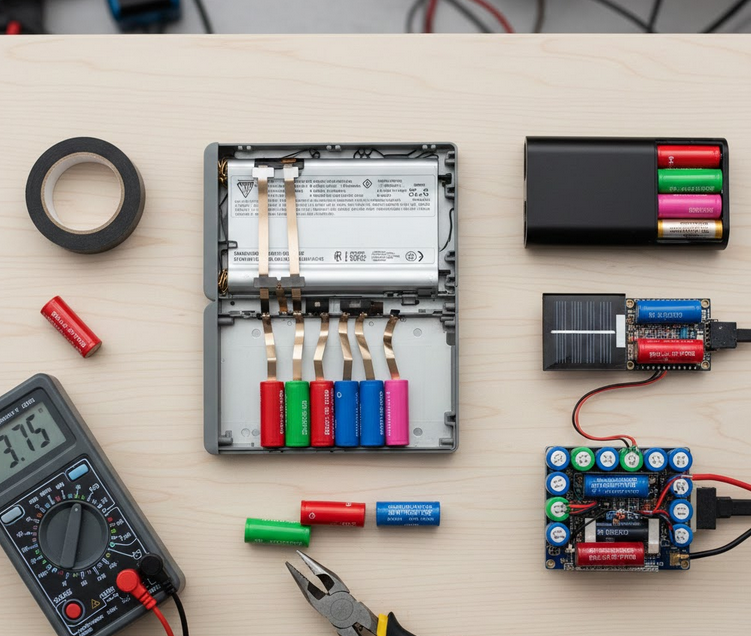
Most people throw away laptop batteries when they stop holding a charge. Usually, only one or two cells in the pack have actually failed. The remaining cells are often perfectly functional and high in quality.
Inside these plastic shells are standard 18650 lithium-ion cylinders. These cells are the backbone of modern portable electronics. You find them in Teslas, power tools, and high-end flashlights.
Why Reuse Laptop Cells?
Sustainability is the most compelling reason to harvest these batteries. Lithium mining is intensive and impacts the environment significantly. By reusing cells, you extend their lifecycle and reduce demand for new raw materials.
Economic savings are another major factor. A single new, high-quality 18650 cell can cost $5 to $10. A discarded laptop battery often contains six to nine of these cells for free.
The Science of Battery Failure
Laptop batteries fail because the Battery Management System (BMS) detects an imbalance. If one “bank” of cells drops below a voltage threshold, the BMS shuts down the entire pack.
This is a safety feature, but it creates “false” waste. While the laptop sees a dead battery, a hobbyist sees a treasure trove. You can often recover 70% to 80% of the original capacity from the healthy cells.
What Can You Power?
The possibilities for these reclaimed cells are nearly endless. They are perfect for low-drain applications like LED lighting or solar power banks. Many enthusiasts build “Powerwalls” to store energy for their entire homes.
Others use them for RC vehicles or portable Bluetooth speakers. However, you must understand the chemistry before you begin. Lithium batteries pack a lot of energy and require respect.
Safety First: Understanding and Extracting 18650 Cells
Extracting cells requires patience and the right tools. You are dealing with stored chemical energy. A short circuit can lead to thermal runaway. This is why safety gear is non-negotiable.
Always wear safety glasses to protect against flying plastic. Use non-conductive tools whenever possible. Work on a fireproof surface like a ceramic tile or a metal tray.
Essential Tools for Harvest
You do not need expensive machinery for this task. A few basic hand tools will suffice for most packs.
- Flush cutters: Ideal for snipping thin nickel strips.
- Flat-head screwdriver: Helps pry open the plastic seams.
- Multimeter: Essential for checking cell health immediately.
- Electrical tape: Used to cover exposed terminals.
The Extraction Process
Start by locating the seam of the battery casing. Carefully insert your screwdriver and twist to pop the plastic clips. Avoid shoving the tool deep into the pack. You might puncture a cell or hit the circuit board.
Work your way around the perimeter slowly. Once the shell opens, you will see the cells wired together. They are usually grouped in pairs or triplets.
Managing the Circuitry
The Battery Management System (BMS) is the small green board. It is connected to the cells by thin metal ribbons. Use your flush cutters to snip these ribbons.
Always snip the wires one at a time. Never cut across multiple wires at once. This prevents a short circuit through your metal cutters. After removing the board, dispose of it at an e-waste center.
Identifying Your Cells
Once the cells are free, look at the PVC wrap. You will see a model number printed on the side. Common brands include Sanyo, Panasonic, Sony, and Samsung.
| Brand | Common Color | Typical Capacity |
| Panasonic | Green | 2900 – 3400 mAh |
| Samsung | Pink/Light Blue | 2200 – 3000 mAh |
| Sanyo | Red | 2000 – 2600 mAh |
| LG | Light Grey/Orange | 2100 – 3200 mAh |
Immediate Safety Check
Check each cell with your multimeter. A healthy cell should read between 2.5V and 4.2V. If a cell reads 0V, it is likely dead.
Cells reading below 2.0V are “low voltage.” These require special care and may be unstable. If a cell feels hot or looks dented, recycle it immediately. Do not attempt to charge damaged cells.
Testing and Grading: Separating Gold from Junk
Not all harvested cells are created equal. Some may hold a full charge, while others lose energy sitting on a shelf. This stage is critical for ensuring the reliability of your DIY projects.
You must identify the internal resistance and actual capacity of every cell. This process is known as “grading.” It allows you to match similar cells together for balanced battery packs.
The Charging Phase
Start by using a dedicated smart charger, such as an LiitoKala Lii-500 or an XTAR VC4. These devices do more than just provide power. They monitor the charging curve and detect “heaters.”
A heater is a cell that turns energy into heat instead of stored power. If a cell feels hot to the touch during charging, stop immediately. These cells are dangerous and should be recycled.
Capacity Testing
Once fully charged to 4.2V, the cell must be discharged to measure its capacity. Most smart chargers have a “NOR Test” or “Discharge” mode. This measures the actual milliamp-hours (mAh) the cell can deliver.
Compare this result to the manufacturer’s original datasheet. A cell is generally considered “good” if it retains 80% or more of its original capacity.
| Capacity Retention | Status | Recommended Use |
| 90% – 100% | Excellent | High-drain tools, E-bikes |
| 75% – 89% | Good | Flashlights, Power banks |
| 60% – 74% | Fair | Low-power LED lighting |
| Below 60% | Poor | Recycle immediately |
Measuring Internal Resistance
Internal resistance (IR) indicates the health of the cell’s internal chemistry. High resistance means the cell will struggle to provide high current. It will also sag in voltage under load.
A healthy 18650 cell usually has an IR below 70mΩ. If you see readings above 150mΩ, the cell is aging significantly. Use these only for very low-power applications like a wall clock.
The Self-Discharge Test
This is the final and most overlooked step. After testing, let the cells sit for two to four weeks. Measure the voltage again after this period.
Healthy cells should hold their voltage steady. If a cell drops from 4.2V to 4.0V without being used, it is a “self-discharger.” These cells will drain your entire battery pack if wired in parallel.
Top DIY Projects for Reclaimed Laptop Cells
Once you have a collection of tested, graded cells, it is time to build. The versatility of the 18650 format makes it the “LEGO brick” of the energy world. You can scale your projects from small handheld devices to large stationary storage.
Always use a Battery Management System (BMS) for every project. A BMS prevents overcharging, over-discharging, and short circuits. It is the brain that keeps your DIY battery safe.
Project 1: The High-Capacity USB Power Bank
Commercial power banks often use low-grade cells to save costs. You can build a superior version using empty “DIY Power Bank Kits” found online. These kits include the housing, USB ports, and the charging circuit.
Simply pop in your best-matched 18650 cells. Since laptop cells are often high-capacity (like Panasonic 3400mAh), you can create a 20,000mAh monster for a fraction of the retail price.
Project 2: Off-Grid Solar Lighting
Laptop cells are perfect for outdoor solar lighting. Standard solar garden lights use cheap NiMH batteries that fail quickly. You can replace these with a single 18650 cell and a TP4056 charging module.
This setup can power bright LED strips for hours. It is an excellent way to illuminate sheds, paths, or signs without running electrical wires.
Project 3: The “Powerwall” for Home Storage
Advanced hobbyists build massive battery arrays to store solar energy. By connecting hundreds of 18650 cells in parallel and series, you can create a 24V or 48V system.
- Parallel connections: Increase the total capacity (Amp-hours).
- Series connections: Increase the total voltage.
These systems can power fans, laptops, or even refrigerators during a power outage. Use “cell fusers” (thin wires acting as fuses) for each cell to ensure maximum safety in large packs.
| Project | Difficulty | Key Benefit | Required Safety |
| Power Bank | Easy | Cheap, high capacity | Built-in kit BMS |
| Solar Light | Medium | Eco-friendly, bright | TP4056 Module |
| RC Battery | Hard | High performance | High-current BMS |
| Powerwall | Expert | Energy independence | Individual cell fuses |
Conclusion: A Sustainable Future
Repurposing laptop batteries is more than a hobby. It is a practical contribution to a circular economy. You save money, gain technical skills, and prevent toxic chemicals from entering the environment.
Always remember to treat these cells with respect. Proper testing, grading, and the use of BMS boards will ensure your projects are both powerful and safe.